

Hunts in Second Life are a tried-and-true way to get some truly fabulous steals, deals, and freebies. For example, Petite Mort and Oubliette are currently having an hunt for six white Easter bunnies on their half a sim, with each clothing prize only L$10 each, a significant saving:


I have spent almost 13 years doing hunts in Second Life, and I have learned a lot along the way. So here are my top 6 tips for Second Life hunts.
Please note that in the following tips and tricks I am using the Firestorm viewer; if you are using another Second Life viewer, like the default SL viewer, you might have to use different keystrokes to get to the features you want. I rely on Firestorm daily, as most people do, and I honestly don’t know the equivalent keystrokes for the default Second Life viewer.
1. Know what you are hunting for
This may seem obvious, but sometimes people engage in an SL hunt without even checking the associated website, which usually contains a picture of the item you are searching for, a list of store locations, and a hint for each location. Freebie blogs can also be valuable sources of information, showing you what the hunt prizes look like before you go to all the trouble of trying to find them. (Don’t forget about Cat Pink’s hunt videos, too!)
Finally, there are SL hunt blogs that tell you about upcoming hunts, like Hunt SL and SL Hunts (the former even has a ten-step plan for how to do a hunt). Visit them every so often to see what’s coming up.
2. Learn how to use your camera
This is also a basic rule: learn how to move your camera around the scene. You don’t even have to move your avatar around; just cam around the store to find what you are looking for. If you learn nothing else, learn how to use your camera.
In Firestorm, the camera controls can be brought up either by clicking the Camera Controls button on the bottom button bar, or by going to the top menu bar and selecting Avatar → Camera Controls.
The camera controls are divided into sections, as follows:


- The leftmost circle allows you to rotate your camera.
- The vertical slide to the right controls zoom; you can drag it or use the +/- signs for finer control;
- The arrows in the square pan the camera left/right and up/down.
- Across the top are six buttons. These are:
- Front view – places the camera in front of your face, and facing you.
- Side view – place the camera over your left shoulder, looking forward.
- Rear view – places the camera behind and slightly above you; this is the default position.
- Object view – allows you to zoom in on objects by clicking them. Hit ESC to leave object view.
- Mouselook view – places the camera in front of you; the camera then moves with your mouse; the camera controls disappear in this view. Hit Esc to leave mouselook.
- Reset view – restores the camera to default.
There are also keystroke commands for most of these options; you don’t necessarily have to use the on-screen widget. Here’s a list of camera controls. After countless hunts, by now they are second nature to me:
| Key | Function |
|---|---|
| Alt-up/down arrow | Zoom camera |
| Alt-left/right arrow | Rotate camera left/right |
| Alt-Ctrl-up/down arrow | Rotate camera up/down |
| Alt-Ctrl-Shift-arrows | Pan camera |
3. Turn on the lights
Are you hunting for an object in a dimly-lit store, or a sim set to midnight? One recent hunt had black eggs hidden in black corners of the store. Drives me absolutely bonkers. Here’s a tip: turn up the lights. If you are in Firestorm, Click on World in the top menu bar, then select Environment Editor, then Sky Presets, then Edit Preset, as shown here:

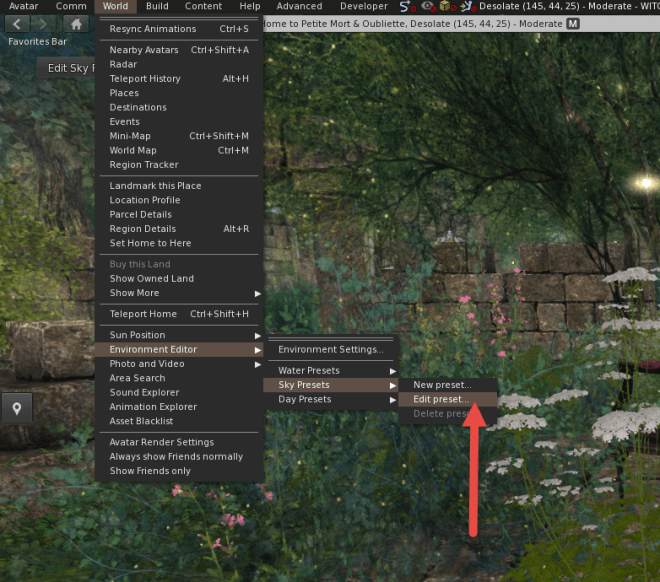
From the list of sky presets, scroll down and select one called CalWL:


Et voilà! Sharp, bright, clear light by which to properly conduct a hunt. In addition to CalWL, you could try out the presets named Nam’s Optimal Skin 1 and Nam’s Optimal Skin 2, which are also very bright.
4. Use a little helper
Now, this tip is controversial, because some would consider it cheating. Some vendors will go so far as to ban you from their sim if you are discovered using one of these little devices. I’m talking about object scanners, items which automatically search the area you are in for a specifically named object. If all the objects you are searching for have a naming convention (e.g. they all start with “POE” for the Peace on Earth annual hunt), then you can find them more easily using an object scanner. You just have to attach it, then walk around the store.
You should be aware that many store owners deliberately use misleading names (e.g. “Pine Floor”) or even gibberish (“asdfghjkl”) when naming hunt prizes in order to thwart people using object scanners. I’m not going to tell you which model to use; you can find them yourself on the SL Marketplace. In fact, you don’t even need to buy one, since there is already a perfectly good Area Search tool built into the Firestorm viewer (you can find it near the bottom of the World menu). And if the idea of using one feels like cheating to you, then just ignore this tip.
5. Use your X-ray vision
Here’s another really useful hunting trick that most people don’t know about. Did you know that you can toggle to wireframe mode in Firestorm, and literally see through objects? If you are using the Firestorm viewer, just pres Ctrl-Shift-R, and you turn on wireframe mode. Pressing Ctrl-Shift-R again takes you back to regular mode. Try it and see! (Note that you will get a momentary black screen when doing this. This is normal.)
Here’s an example to demonstrate. This is the normal view:


And here is the wireframe mode:


6. Only as a last resort: derender the sim/store piece by piece
This last tip is only if you have exhausted all other methods of hunting, and you still cannot find that elusive prize which you absolutely must have! Essentially, you select walls, floors, fixtures, and temporarily derender them (i.e., make them invisible). Keep doing this until you find what you are looking for.
To do this in Firestorm, right click on the object you wish to remove. From the menu which appears, click on More, then More again. You will see Derender as one of the options on the pie menu. Click on Derender, and select Temporary. And poof! It’s gone. Handy, eh?
Here’s an example of why hunts in Second Life can be so rewarding. This outfit consists of two pieces from the Easter bunny hunt at Oubliette and Petite Mort (the flower basket is a freebie at the landing point, and it comes with a hold animation).


This avatar is wearing:
- Mesh Head: Giselle Bento head by Altamura (no longer available for free; this was an Altamura gift from Christmas 2017 at the eBENTO event, and you had to join the Altamura group for L$50 to get it).
- Mesh Body: Jenny Bento body by Altamura (this was a free gift from the 2017 Women Only Hunt, and on this version, you can remove the head and replace it with any other mesh head, as I did here. Note that this free mesh body is now available at the Freebie Megastore at London City (more information here), but you cannot remove the head on the newer free version.
- Hair: Hannah by MINA Hair (this is an old gift from a previous Second Life shopping event, no longer available for free)
- Top: Lace trim sweater by Petite Mort (hunt prize; L$10)
- Skirt: Cream midi skirt by Petite Mort (hunt prize; L$10)
- Shoes: Sonnet pumps by Hilly Haalan (more details here)
- Flower Basket: Free gift from Oubliette and Petite Mort (available at the spawn point)
TOTAL COST FOR THIS AVATAR: L$70

