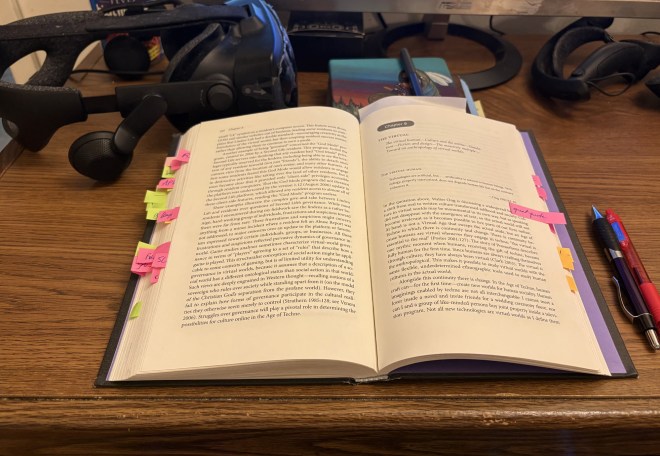
I am having a pretty horrible week, between receiving more bad news from a doctor about my continuing neck and shoulder pain, and stupidly getting myself into a single-vehicle car accident that has left me with a very badly dented rear bumper. But yes, despite these problems, I am still working on my OER textbook about the metaverse. Here’s a sample of chapter two, which is all about Second Life:
Here’s the text, in case you don’t want to squint at the screen capture above:
In many ways, this chapter is both the easiest and the hardest one to write for this entire book. It is the easiest to write, because of the nearly two decades of experience I have had in Second Life since I first set foot in the platform in March 2007. In that time, I have created and embodied a small army of avatars (as I mentioned in the Preface), built and furnished homes, explored other people’s creations, made friends and acquaintances from around the world, took part in fantasy and historical roleplay, and attended countless events, ranging from conferences to concerts. However, that same lived experience makes it harder for me to write about Second Life, because it makes it more difficult to step outside of my biases toward this virtual world, and look at SL from a detached, critical perspective.
What most casual observers don’t understand about Second Life, which has now been operating for over 23 years, is that it still exists, and that is still is a very profitable endeavour for Linden Lab, the company founded in 1999 by Philip Rosedale. Wagner James Au, in his book The Making of Second Life, writes memorably about those humble first days:
“Building the metaverse wasn’t even the company’s main goal when it began operations in 1999, in a warehouse on Linden Street, a narrow alley in San Francisco’s Hayes Valley. Like many parts of the city during the Internet’s first boom times, the street teetered between gentrification and drug-addled squalor. On one end of Linden were upscale restaurants serving the arrogant young mandarins of dot-com excess; on the other was an unattended parking lot with a clientele who often slept in their cars. Linden Lab’s immediate neighbors were wholly appropriate for the world that would eventually emerge from their servers: a dubiously grungy auto body garage and a fetish boutique.” (Au, 2008 p. 13)
I will probably continue to drop bits and pieces as I continue to write. Obviously, I won’t be posting to this blog as often as I used to, which is understandable. I just wanted to let you know that I’m still here.
P.S. Yes, I found and fixed the small typo in the screen capture, in the transcribed text!
P.P.S. Oops, wrong page number in my citation! Corrected.
NOTE: Have you read part one of this two-part series? I review two other 2008 books about Second Life here, and talk about how well they’ve held up since publication:
Boellstorff, T. (2008). Coming of age in Second Life : an anthropologist explores the virtually human. Princeton University Press.
As I mentioned in my previous blogpost, Tom Boellstorff, a cultural anthropologist at the University of California, Irvine, wrote this academic book in 2008, after conducting an anthropological study of Second Life and its residents. The time period of Tom’s anthropological fieldwork, which forms the basis of this book, ran from June 3rd, 2004 to January 20th, 2007 (p. 7), a period he refers to as the “coming of age” of Second Life as a virtual world, when it grew from 5,000 to ten million resident accounts (p. 83).
Boellstorff stated his goals for this academic monograph as follows (p. 24):
One goal of this book is substantive: to provide an ethnographic portrait of Second Life. Another is methodological: to demonstrate the potential of ethnography for studying virtual worlds. A third goal is theoretical: to contribute toward a better understanding of virtual worlds in all their constantly transforming complexity.
While I do seem to remember that I had, some time in the past, dipped my nose here and there into sections of Tom’s book, I had not really had an opportunity to read through the entire work until this week (thank you to my university for approving my research and study leave!). So here is my review of Tom’s book, along with some quotes which I quite liked.
This is a structured, nine-chapter academic work, which Tom recommends you read in order as he builds his arguments. The book includes a glossary, a notes section, an extensive bibliography, and a professionally-compiled index—all features which were greatly appreciated by this librarian!
Sticky notes galore in my university library’s copy of Tom’s book!
There’s so many great insights that I sticky-noted, but I’m going to start off with a quote from his final chapter, The Virtual (p. 217):
Culture in virtual worlds may be monumental in its own way, but as speaking did not disappear with the emergence of text, so the actual world will not become irrelevant as it becomes possible to live parts of our lives online. At hand is not a Virtual Age that sweeps the actual aside, but an Age of Techne in which there is continuity and change. There is continuity because humans are virtual whenever they engage in techne: “the virtual is essential to the real” (Poster 2001:127). The story of Prometheus describes one mythic moment when humans, receiving the gift of techne, became fully human for the first time. Since humans are always crafting themselves through culture, they have always been virtual (Clark 2003). The virtual is the anthropological[emphasis Boellstorff’s]. This makes it possible to study virtual worlds with the same flexible, underdetermined ethnographic tools used to study human cultures in the actual world.
The Age of Techne is a theme throughout this book, the term Boellstorff uses to describe the technology of the current information age is which we live (p. 21). Later, on p. 38, he states:
In this discussion and throughout this book, I might be seen to be trying to have it both ways; I claim that notions of the virtual and of techne are in one sense as old as humanity, and in another sense I claim that something very new is happening in virtual worlds. This is intentional. It is crucial to keep in mind the history shaping the present moment, while also identifying how that present moment is not reducible to its history. What makes virtual worlds different from all hitherto existing forms of virtuality is that techne can take place inside them [emphasis Boellstorff’s], rather than solely in the actual world to produce them: “where most tools produce effects on a wider world of which they are only a part, the computer contains its own [virtual] worlds in miniature” (Edwards 1990:109). Techne makes wood and ideas into a newspaper, but techne not only makes silicon and ideas into a virtual world; techne can take place within that created world itself. In virtual worlds, techne produces a gap between actual and virtual in the realm of the virtual [emphasis Boellstorff’s]. Swallowing their own ontological tails, virtual worlds for the first time allow techne to become recursive, providing humans with radically new ways to understand their lives as beings of culture as well as physical embodiment.
As you can see from these two excerpts, Boellstorff is writing for an academic audience, so it might be a tough slog for those of you who are more used to reading mass-market works written for the general public, but it’s well worth unpacking his ideas! Virtual worlds created by techne (i.e, the act of software programming), can in themselves become arenas for techne (i.e creating a house in Second Life)! Indeed,this has been one of the primary reasons for the initial and continued success of Second Life: its ability to be a blank, three-dimensional canvas for people to be creative, and build anything they can imagine.
On page 25, Tom writes:
Drawing upon the work of a range of scholars of technology and society, I will develop a theory of this virtual worldview as techne, and of the person who engages in techne not just as homo faber (“man the maker”) or homo ludens (“man the player”), but above all as homo cyber. The human online, the virtual human. In using the term “techne,” I will draw upon a philosophical distinction between knowledge (episteme) and technology or art (techne), examining how virtual selfhood is becoming predicated on the idea that people can craft their lifeworlds through intentional creativity.
On page 29, he makes a clear distinction is his defnition of homo cyber, arguing that virtual worlds make us more human rather than post-human:
While some see virtual worlds as marking the emergence of the posthuman, through terms like homo cyber I argue that the forms of selfhood and sociality characterizing virtual worlds are profoundly human. But while the emergence of virtual worlds “does not necessarily mean the end of the human . . . we need to see the human as re-configured and organized differently” (Nayar 2004:21). This is one meaning of the phrase “virtually human”—in virtual worlds, we are not quite human. The relationship between the virtual and the human is not a “post” relationship where one term displaces another; it is a relationship of coconstitution. Far from it being the case that virtual worlds herald the emergence of the posthuman, in this book I argue that it is in being virtual that we are human [emphasis Boellstorff’s].
Another theme that runs throughout the book is that of creationist capitalism, described by Boellstorff as “a mode of capitalism in which labour is understood in terms of creativity, so that production is understood as creation.” (p. 206). He goes on to write (pp. 207-208):
Creationist capitalism draws structuring principles from the individualistic ethos of contemporary capitalism—specifically its Silicon Valley variant, which can be termed the “Californian Ideology” (Barbrook and Cameron 2001; see also Turner 2006). Given that Linden Lab was based in California and its CEO, Philip Rosedale, grew up in San Diego, it is not surprising that Second Life was particularly shaped by assumptions of this ideology, which “has emerged from a bizarre fusion of the cultural bohemianism of San Francisco with the high-tech industries of Silicon Valley. . . . [T]he Californian ideology promiscuously combines the free-wheeling spirit of the hippies and the entrepreneurial zeal of the yuppies. This amalgamation of opposites has been achieved through a profound faith in the emancipatory potential of the new information technologies” (Barbrook and Cameron 2001:364).
This ideology, by no means limited to California, is an economic model of “prosumption” where capitalist subjects produce what they consume, turning consumption into a form of production (Toffler 1980).
And again, another reason for Second Life’s longevity (and profitability!) is its ability to allow residents (who are themselves consumers) to create and sell goods and services to other residents. For example, an SL user can purchase textures from an in-world store, apply them to furniture she creates, and then vend that chair or table to another user. Linden Lab’s November 2003 decision to give creators the intellectual property rights to their creations (p. 214) was a key decision to enable the explosion of creationist capitalism across the grid. (I particularly loved Tom’s quoting of “the free-wheeling spirit of the hippies and the entrepreneurial zeal of the yuppies;” to me, this description perfectly encapsulates Second Life’s ethos!)
Now, I am going to jump around a bit within the book, talking about other sections I enjoyed. For example, on page 102 I was amused when Tom compared SL residents complaining about lag being equivalent to real-life people complaining about the weather. Accurate! In a further discussion of the concept of lag, I came across the following, highly interesting fact (p. 103):
In the context of Second Life, lag originated in the truly immense amount of information represented by its land, the objects on that land, and the avatars inhabiting that land. By early 2007 there was by one estimate about one petabyte (a million gigabytes) of data in Second Life. At that point, were all of the books in the Library of Congress digitized (about 30 million volumes), it would have been equivalent to only about 2 percent of the data stored inside Second Life.
I would dearly love to see this assertion updated with current statistics for both Second Life and the Library of Congress, to see how it has changed over time! Alas, I do not have the time to do this research myself (I have my hands full as it is!).
There’s also a lengthy discussion of the AFK (Away From Keyboard) phenomenon in Second Life and its various meanings (pp. 106-112), ending with the following section:
Residents sometimes explicitly scheduled mundane actual-world activities like laundry to coincide with events in Second Life, so that they could run back and forth to the washing machine: as one resident emphasized, “AFK works so well because people do not know what we are doing [in the actual world].” Residents sometimes said they wished they could “go AFK” in the actual world to escape uncomfortable situations, but knew this was not possible: “no one ever says ‘AFK’ in real life.” Such conscious uses of AFK reflect the consequentiality and durability of the virtual/actual binarism: the boundary between virtual and actual is constituted and reinforced by movements between them. Like lag, AFK reveals how virtual worlds are places in their own right, temporally linked to the actual world but constantly at risk of falling out of synch. Indeed what I term the “AFK test” provides one of the clearest means for identifying virtual worlds: if you can go “AFK” from something, that something is a virtual world. [Emphasis mine].
I also appreciated Tom’s discussion of the use of the word avatar to describe Second Life users, as well as his discussion of alts (alternate avatars) on pp. 128-134. Here’s a sample quote from page 128:
Throughout this book I have been referring to the virtual embodiments of persons as avatars, a term used in many online worlds. This Sanskrit word originally referred to the incarnation of a Hindu god (particularly Vishnu). With reference to cybersociality, the term was probably first used in the virtual worlds Habitat and Ultima IV in the mid-1980s, as well as in Neal Stephenson’s 1993 science fiction novel Snow Crash (Morningstar and Farmer 1991; Stephenson 1993:470). While “avatar” (“avie” or “av” for short) historically referred to incarnation—a movement from virtual to actual—with respect to online worlds it connotes the opposite movement from actual to virtual, a decarnation or invirtualization.
Among other topics, Boellstorff discusses the popularity of Second Life among various communities, such as the furries, queer people, and those with autistim and/or ADHD. I’m not going to quote the sections, because this blogpost is already reaching War and Peace length; I would advise you to obtain your own copy of Tom Boellstorff’s book, and read it yourself!
Even as a almost-nineteen year resident of Second Life (in one avatar or another), I gained some excellent insights from reading this book, and I can recommend it highly. It provides a valuable snapshot of a crucial time period in SL’s history, and Tom Boellstorff’s commentary on Second Life, and its cultures and idiosyncrasies, has stood up very well in the 18 years since this academic monograph was published.
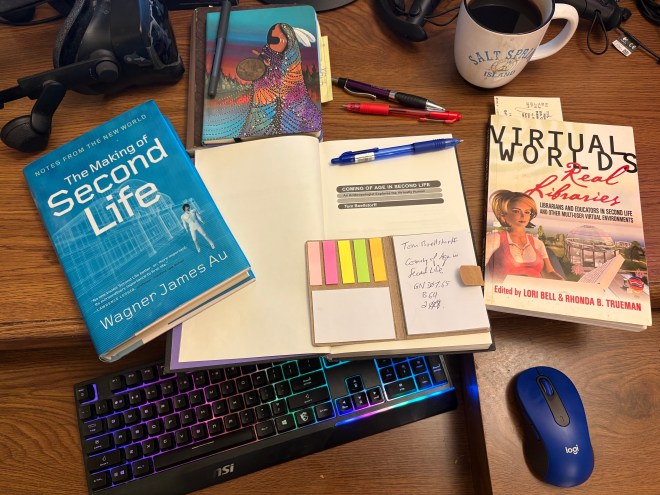
I am still working away—slowly—on the first two chapters of my OER textbook about the metaverse. Today, in an effort to motivate this librarian to do some (gasp!) actual dead-tree book reading as part of my research for chapter 2, which is all about Second Life, I have decided to make it more fun by simultaneously writing a blogpost review of three books while I (re)read them. I get to kill two birds with one stone: I move forward in my research while taking notes for my own book, and you, my faithful blog readers, get some content. (Also I also get to rest my sore neck and shoulder joints and muscles by NOT sitting in front of a desktop computer all day.)
The three books, all published in the same year, 2008, are:
Au, W. (2008). The making Of Second Life: notes from the New World. HarperCollins.
Bell, L., & Trueman, R. B. (2008). Virtual worlds, real libraries : librarians and educators in Second Life and other multi-user virtual environments (1st ed.). Information Today.
Boellstorff, T. (2008). Coming of age in Second Life : an anthropologist explores the virtually human. Princeton University Press. (Please see the note at the end of this blogpost; my review of Tom Boellstorff’s book is here.)
Virtual Worlds, Real Libraries: Librarians and Educators in Second Life and Other Multi-User Virtual Environments
Lori Bell (a librarian with the Alliance Library System in Illinois) and Rhonda B. Trueman (an acquisitions and access services librarian at Northwest Florida State College) were both highly active in the collective work of setting up and running libraries in Second Life, circa 2007-2009 (my first years in Second Life). They are the co-editors of this 21-chapter book, with contributions from 26 authors.
This book referred to virtual worlds as MUVEs (Multi-User Virtual Environments), perhaps to carry on the tradition of using MU* acronyms to refer to previous, text-based virtual worlds (MUDs, MUSHes, etc.). MUVE proved to be a unpopular term, and as far as I am aware, it did not catch on.
A passage from the introduction (by Bell & Trueman) struck me:
Libraries need to look at places on the web, including virtual worlds, where potential library users are active and assess how library services might be integrated into these environments. Many individuals now involved in virtual worlds may not be traditional library users. By putting ourselves where these users are, librarians have a remarkable opportunity to increase use of the brick-and-mortar library, promote library services and materials, and support education initiatives in SL and other virtual worlds.
Some see libraries in virtual worlds as representing a “third type” of library presence, in addition to traditional brick-and-mortar institutions and virtual interactions conducted via chat or email. Virtual worlds are the new frontier; they offer librarians the exciting opportunity to serve as leaders in shaping these environments and influencing their use in education, business, and day-to-day life. Believe it or not, virtual world libraries are also an excellent way to promote traditional library services through book discussions, author programs, and displays that inspire reading.
Collaboration is another important reason for libraries to be in virtual worlds. Using SL, in particular, many of the librarians you will meet and read about in Virtual Worlds, Real Libraries have engaged with individuals from all corners of the globe. They have discovered opportunities to collaborate on projects with nonprofits, corporations, and educational groups; these projects would have been difficult, if not impossible, to coordinate in the real world.
While I do agree that Second Life can provide opportunities for collaboration, I would still argue that SL, still, has too steep an entry learning curve as opposed to, say, using a Discord server, or the iPhone in your pocket. But the dream of using Second Life to reach new users, or create a new “third space,” never materialized.
In chapter one of this book, Tom Peters lists a series of questions about these volunteer librarians’ early (circa 2006-2008) work in Second Life:
Do avatars even want and need library services in SL?
If so, what types of services and collections do they want and need?
Would one library serve all avatars, or should there be different types of libraries, as in the real world?
How can we create links and bridges between existing, real world library collections and services (print and digital) and the collections and services being built in SL?
How can or should librarianship in SL be structured and managed?
How can or should it be governed?
How can or should it be funded?
Now, 18 years later, I think that we can probably answer these questions. From my own experience and perspective, the people who used Second Life were, by and large, not looking for library services, and did not make use of them when they were offered. And again, asking potential library users to spend an hour getting up to speed as an avatar in Second Life, just to ask a reference question or attend an event, was probably too much to ask. The Community Virtual Library (CVL; one of the few virtual libraries still operating on the grid; SLURL) is beautiful, but often deserted when I come to visit. However, there are some exceptions to this, such as Virtual Ability (SLURL) continuing the pioneering work of HealthInfo Island to this day. And both CVL and Virtual Ability continue to host regular events as well.
But, by and large, the answer to the first question Tom poses is no, the overwhelming majority of avatars don’t need or use library services in SL. It didn’t seem to matter what kinds of services were offered; aside from novelty and curiosity, the users weren’t there. Stymied by the copyright restrictions of traditional publishing, the “links and bridges” Tom mentions between real-world collections and services were difficult or impossible to implement, leaving most SL libraries restricted to copyright-free works. Another big problem was the fact that this 2006-era initiative was volunteer-driven, and the inevitable volunteer burnout, combined with the 2008 economic downturn, led to many of the libraries mentioned in this book shutting down their services after a couple of years (a notable exception being the San Jose State University’s iSchool, which still maintains a region; here’s a SLURL if you wish to explore the sim and its many exhibits, such as its Banned Books area).
In chapter 5, Rhonda Trueman discusses some of the problems librarians encountered while working in the InfoIsland regions:
There are three temptations, though, that can derail the best of intentions. One temptation is to become immersed in this environment to the detriment of real world activities; another is to focus only on a set task or goal as a volunteer and be blinded to the creativity and innovation that abound in this environment; and yet another is to put so much time into virtual volunteer activities—while still trying to balance a real life job and a family—that one becomes burned out. Although most of our librarians in Alliance Virtual Library are volunteers, many also have a library on Cybrary City 1 or 2 that represents the real life library for which they work. Many of these librarians donate their own personal time to building a virtual library presence, but others are assigned and paid for this role as a portion of their daily work. Difficulty in managing real world work activities combined with SL work activities, neglecting real world responsibilities, and burnout are the reasons volunteers who decide not to continue in Alliance Virtual Library cite most often.
And, as someone who did spend a little bit of time volunteering to man the reference desk at InfoIsland, I could relate mostly to the first temptation Rhonda lists, rather than the other two! And yes, I could see that trying to juggle this new thing, on top of all the regular responsibilites of librarianship, would lead to burnout! I myself left because I found myself spending more and more time on activities outside of librarianship in Second Life.
Overall, it’s rather sad to see how much the initial burst of enthusiasm of that time period (2006-2009) has faded to a faint echo today. By and large, libraries and librarians pretty much decided to abandon Second Life fairly early on its history (along with most other real-world entities such as corporations, who had experienced a similar boom, disillusion, and retreat). I discuss this is more detail in a 2018 blogpost, here: The Rise and Fall of Library Use of Second Life: What Happened to All the Libraries That Used to Be in Second Life and Other Virtual Worlds?
The Making of Second Life: Notes from the New World
Wagner James Au, of course, is the ur-reporter on Second Life, and someone who has been participating in (and commenting on) Second Life for a long time. Wagner joined Linden Lab as an in-house chronicler of their work on Second Life (based on a recommendation made by Howard Rheingold when he was given an early demo). Au joined SL in April of 2003, when the platform was still in beta test, with only a few thousand users. And, 23 years later, he is still writing about Second Life!
While Bell and Trueman’s book was written by and for librarians and educators, Wagner James Au’s work was a mass-market book aimed at the general public who might or might not have heard something about Second Life by the time it was published in 2008. (To provide a bit of context, I had joined SL in March of 2007, merrily creating my first avatars while Au was busy writing this book between January and October of 2007).
This difference in audience accounts for one irritating thing about this work to this librarian: the absence of formal citations! This often led me to my web browser to run a Google keyword search or, (in some cases) to make a Claude or Gemini inquiry in natural language, and cross my fingers in hopes of finding the same information source which the author was referring to. Here’s a good example, taken from the Introduction to Au’s book:
U.S. Homeland Security was already there, financing biochemical terrorist attack simulations; Harvard’s Berkman Center was well ensconced, too, offering lectures on law and society to humans and flying robots alike; the venerable BBC was hosting live music concerts; NBC was launching their annual Christmas lighting ceremony virtually, while CBS was busy creating a metaverse version of Star Trek. Warner Brothers was promoting its latest artist with listening kiosks that resembled a New York loft; a research team from IBM was prototyping next-generation Internet technology; and Cisco, Dell, and Microsoft had virtual islands and schemes of their own.
Again, no references provided for any of Wagner’s assertions here of events taking place circa September 2026 in Second Life. In particular, my ears perked up when I read about the U.S. Homeland Security Department! I really wanted to know more about what the U.S. Homeland Security Department was doing in Second Life.
Rather than spending hours tracing each of these claims back to their original sources, I decided to turn to generative AI. I pasted the above paragraph into Claude AI (Opus 5.5, connected to the Undermind AI research tool), and asked it: “Could you please find the information sources Wagner James Au used in writing this paragraph about Second Life in 2006?”
Five minutes later, I got back the following summary, plus a full report (which I will not share here; the report includes thorough fact-checking against other information sources, and provides citations for all its sources in APA format):
I checked every clause in Au’s paragraph. All the organizations he names really were in Second Life, but the paragraph squeezes events from October 2005 to mid-2007 into one “already there” moment, and two details go further than the sources do.
Well supported: Harvard’s Berkman Center and the CyberOne course (September 2006), BBC Radio 1’s One Big Weekend (May 2006), NBC Universal’s virtual tree lighting (November 29, 2006), Sire/Warner’s Regina Spektor loft (May 2006), IBM (September–November 2006) and Dell Island (November 14, 2006).
Homeland Security: Au’s own 2005 blog post and 2006 First Monday essay support “DHS-funded disaster preparedness simulator.” I found nothing that names a “biochemical terrorist attack” scenario, and the event is from 2005, a year earlier than the paragraph suggests.
CBS’s Star Trek area: this is the weakest claim. It was announced in January–February 2007 and built by the Electric Sheep Company. Secondhand forum accounts say it was never finished, so “busy creating” is only accurate as of early 2007.
Cisco and Microsoft: Cisco’s islands opened in December 2006. Microsoft’s best-documented island, Visual Studio Island, is from 2007.
Spektor wasn’t a “new artist”:Begin to Hope was her fourth album.
Au’s wording for NBC, Warner/Sire and CBS closely matches a February 13, 2007 Hollywood Reporter roundup, which looks like his likely source. I couldn’t see the book’s endnotes, so that’s not confirmed.
The report includes APA-style sources for each claim, a suggested dated version of the paragraph for your OER text, and a list of primary sources to get next. Before quoting the DHS item, pull the archived copy of the October 2005 blog post from the Wayback Machine and check a print copy of the book’s notes.
This, by the way, is something at which Claude Opus 5.5 + Undermind shines: acting as a surprisingly thorough research assistant, definitely saving me hours of time!
Now, back to the business at hand: Wagner’s book and how it has aged since publication. How have his predictions about Second Life played out? Wagner does devote an entire chapter (chapter 13) to speculation about the future of Second Life, and he had other predictions sprinkled throughout the rest of this book. In many cases, I pasted sticky notes into my physical copy of the book, so I could come back afterwards and follow up a little bit about what did actually happen in the intervening 18 years since they were written. Few other observers can boast such longevity, and that alone makes his perspective valuable (even if his prognostications sometimes proved incorrect). Let’s look at some of Au’s statements, written in 2007 and published in 2008, and see how they have held up in the years since then.
Statement: On page 217, Au writes that “user-created online worlds like Second Life will be integral to the future Internet.” While Second Life has inspired many people as to the possibilities of the metaverse, and while it continues to be profitable for Linden Lab, I would argue that it has failed to become “integral.” Eighteen years after the publication of Au’s book, it remains a niche product (albeit one with a passionately devoted fanbase). Au refers to this scenario in his book as “Second Life Plateaus” (p. 221). Efforts to open-source SL viewers and servers led only to a myriad of smaller OpenSim systems, none of which proved to be as successful or enduring as Second Life itself.
Statement: On page 229, as part of brainstorming session in which Au participated: “Real-world companies will be incubated, developed, and in large part run in the metaverse, which will be the office space and whiteboard for employees across the world.” I can pretty confidently state that this prediction, sadly, did not come to pass, even after a pandemic forced a global lockdown! What happened was that people turned to more accessible tools like Zoom and Microsoft Teams, rather than (as I mentioned before) working their way up what was the still steep learning curve of Second Life. Setting up an avatar was not as simple as sitting in front of a webcam!
Statement: There’s a whole section of Au’s book (pp. 232-234) where the author discusses with Philip Rosedale the possibility of using the metaverse as a way to live forever, via “uploading our very consciousness into SL, similar to what futurists like Ray Kurzweil imagined.” (p. 233). Even with the recent generative AI advances since 2022, this is still something which remains fully in the realm of science-fiction speculation!
Statement: In a section where Au gives advice to businesses wishing to set up shop in SL, he states: “Find a killer SL app: Take the time to create a utility or service that both is unique to SL and leverages the main element that makes SL unique: dynamic user-created content in an international virtual community” (p. 260). Unfortunately, after the corporate boom-and-bust circa 2006-2008, few real-world businesses have bothered with Second Life, and a “killer SL app” (i.e., one that would make people want to set up a Second Life account, and use the platform) failed to materialize. Something that people inside of SL would already use and appreciate? Yes, there have been many such success stories. Something that would entice people to join and stay in SL? By and large, nope.
Statement: Au writes, in the preface to the book (p. xv): “Odds are that user-created virtual worlds like Second Life will soon be the targets of financial mergers (and again, as this book reaches press, you may have already read about such plans on business news sites).” At the venerable age of 23, Linden Lab still has avoided merging with another company (although they did eventually spin off Tilia, their financial services section, selling it to Thunes). It has, somewhat miraculously, literally remained its own world, with its own culture. In fact, its still-thriving adult content and activities probably make it a less-tempting acquisitions target among larger companies seeking to gain a toehold in the metaverse. What’s interesting is that so many, much larger companies, have tried (and, in many cases, failed) to build their own, competing metaverse platforms (*cough*Meta*cough*).
Tom Boellstorff conducted more than two years of fieldwork in Second Life, living among and observing its residents in exactly the same way anthropologists traditionally have done to learn about cultures and social groups in the so-called real world. He conducted his research as the avatar “Tom Bukowski,” and applied the rigorous methods of anthropology to study many facets of this new frontier of human life, including issues of gender, race, sex, money, conflict and antisocial behaviour, the construction of place and time, and the interplay of self and group.
NOTE: The task of reading through these three paper books—note to mention, annotating them with sticky notes!—has taken me longer than anticipated. (My workflow is much more streamlined for full-text electronic books and articles.) Therefore, I have decided to just post my notes from the first two books today, as Part One, and then write a part 2 of this blogpost, a review of the third book, once I have finished reading it. Part 2 coming soon!
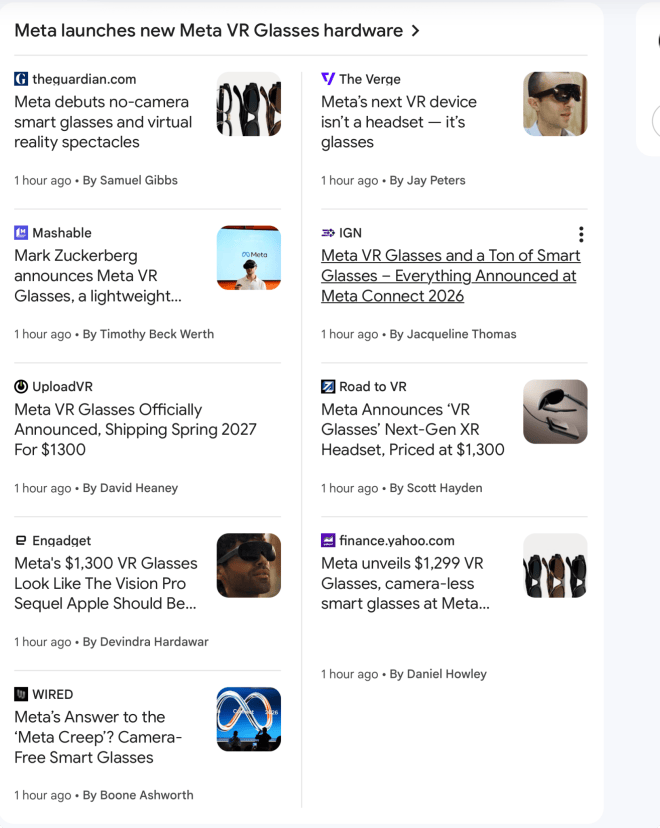
Well, I was going to write my next blogpost about how I am using Claude AI and Undermind to research my OER textbook on the metaverse, but then I lay down on the sofa and pulled up Google News on my trusty iPad, only to see much hullabaloo about Meta’s new lightweight VR glasses, so I guess I’m gonna be talking about that today:
You gotta hand it to Meta; they do know how to grab attention (and they have deep enough pockets from vacuuming up and selling every shred of personal data of its 3 billion users to pay for this news media onslaught!) CEO Mark Zuckerberg probably found the money in his couch cushions. 😉
Now, before I say anything else, I am going to preface this by saying that, when it comes to Meta and their line of virtual reality headsets, I am sorely conflicted. The hardware (particularly the Meta Quest 3) is amazing for the price. It’s the surveillance capitalism that underlying this amazing hardware that’s the problem.
It’s enough money that Mark Zuckerberg can afford to drop billions of dollars on what ultimately became the utter failure of social VR platforms Horizon Worlds, and Horizon Workrooms. Proof positive that deep pockets and executive fiat cannot force the populace to accept something that looked and felt like it was constructed by handsomely-compensated engineers being directed by even-more-handsomely-compensated executive committees. Horizon Worlds (which still limps along on a last-minute reprieve, although it is on life support), and Horizon Workrooms (the dog which Meta thankfully took out behind the shed and shot earlier this year) somehow managed to be both dreadfully cartoonish and utterly soulless at the same time.
Meta lost me back in the days when they bought out Oculus, and then insisted that users of Oculus VR headsets (I owned an Oculus Rift at the time) had to get a Facebook account in order to continue use the devices. I responded by binning my Rift and switching to a Valve Index (which I use at home) and a Vive Pro 2 (which currently sits collecting dust at work while I am on my research and study leave). Frankly, I don’t use PCVR (i.e. a tethered VR headset attached to a high-end gaming PC) nearly as much as I used to.
Partly it’s because I am still enamoured with my Apple Vision Pro, and partly it’s because I finally understand something fundamental about the first generation of social VR: nobody wants to wear something on their face. Both Philip Rosedale (High Fidelity, now long shuttered) and Linden Lab (Sansar, miraculously still limping along after being sold) bet the farm that hundreds of thousands of people would take up PCVR and visit their metaverse platforms—a bet which they lost, badly.
Which brings me back to Meta and their announcement of lightweight virtual reality glasses, which apparently was announced this evening, while I was engaged in research-related chatter with Claude and Undermind:
The teaser video for Meta VR Glasses (coming soon!)
The link in this video for the product called simply Meta VR Glasses takes you to the following page, where you can sign up if you really want to be spammed to death because you didn’t bother to read Meta’s eye-wateringly detailed 5,474-word Terms of Service and their 6,611-word Privacy Policy, before blithely agreeing to part with your name and email address:
How do I know this? Well, Meta smartly won’t let you paste those two web pages into a word counter website (something I am sure many commenters have tried before me!):
But they can’t stop me from cutting and pasting the entire text into Microsoft Word, and getting a word count from there:
Meta’s Terms of Service document (approsimately 5,500 words)Meta’s Privacy Policy (weighing in at over 6,500 words) might just be heavier than its new VR glasses 😂
Most people, rather than dig through approximately 12,000 words of legalese, would simply shrug and let Meta monitor them. I’m not going to bother (and I’m quite aware that, even though I haven’t touched Facebook in many years, they still have some sort of profile on me anyways). But I’m damned if I’m going to deliberately add to that treasure trove of data points, sliced and diced and sold to the highest bidder.
Meta (formerly known as Facebook) is already in deep, deep trouble with various countries over deliberately making its products addictive to both children and adults. And that colours how I look at whatever hardware Meta is trumpeting. But hey, let’s take a quick look at it anyways. I am only going to cite one source in this blogpost; I will probably come back ’round and write more later.
Meta VR Glasses were just officially announced. Priced at $1300*, they have 2.4K micro-OLED displays, weigh 100 grams, and are powered by a tethered puck with Qualcomm’s Snapdragon Reality Elite chipset.
The puck runs the same operating system as Quest 3, and supports all the same content, rendered at notably higher resolution thanks to a combination of the more powerful chipset (essentially an XR2 Gen 3 by a different name) and eye-tracked foveated rendering. It features 12GB of RAM and 128GB of storage, and there’s a microSD slot in the puck to expand it.
Foveated rendering is essentially this: the headset tracks where your eyes are looking and puts more pixels there, while pulling them away from where you’re not looking. It’s a bit of sleight of hand.
Also, that 100-gram weight is probably just the glasses themselves, which are doing what Apple did with the Apple Vision Pro, and diverting a lot of the weight of this device via a cable snaking down to what they are calling a puck in your pants pocket (a puck? really?!?? how many rectangular pucks have you seen???).
David continues:
The stark difference between Meta VR Glasses and any Quest, however, is the split architecture, and the dramatic reduction in weight and bulk this enables.
Meta VR Glasses have no onboard computing, not even a tracking coprocessor, and thus entirely rely on the puck, which provides both power and data over a thin and flexible fiber optic cable.
The visor has an open-periphery design, so you naturally see the real world to your sides and below you. It’s built with a magnesium alloy that minimizes weight while also enabling a fanless, passively cooled design that weighs “around” 100 grams.
Even David is using quotation marks. As the British like to say, “There’s many a slip ‘twixt the cup and the lip,” and it will be interesting to see how closely they adhere to this promise (these glasses will not be shipping to consumers until spring of 2027).
The field of view of these glasses is also noticeably constrained (70° × 66°) compared to the Meta Quest 3 it replaces (110° × 96°). To compare, Claude AI tells me that “Apple has never published an official field of view for the Vision Pro, so all the numbers come from third-party measurements and optical modeling,” giving estimates of horizontal FOV as somewhere between 100-110°. While Apple hasn’t published any information themselves on the vertical FOV, two different sources cited by Claude give the varying figures of 77-90°, which shows you just how much these tech companies guard the details of their products! Which, of course, makes the VR YouTubers dig even harder!!
When prompted, Claude AI gives two rather different figures for the Apple Vision Pro’s vertical field of view.
But I digress. David finishes his report by stating:
Meta VR Glasses will also feature the first implementation of Hologram, the company’s productization of its Codec Avatars research. Similar to Apple Vision Pro’s Personas, it will let you join flatscreen WhatsApp video calls as a photorealistic face-tracked avatar, and appear as a full-scale realistic avatar in calls with other Meta VR Glasses (and eventually Quest 3) owners.
However, at launch in spring, your spatial Hologram will be a “2.5D” stereoscopic video stream, at true scale but only seen as a front-angle view. Even if you change your perspective, the Hologram will stay as a head-on perspective, like billboarded assets in a video game. Meta says it plans to evolve Hologram over time post-launch to become a truly 6DoF 3D system, at which point it will become the default platform-level avatar experience for its VR platform, effectively superseding the cartoon Meta Avatars.
Frankly, three degrees of freedom and a “2.5D” spatial Meta Hologram do not sound anything like the continually-improving (and frankly, sometimes unnerving quality) of Personas on the Apple Vision Pro. While chatting with people via the InSpaze app in my AVP, have often completely forgotten that I am not really looking at them, but instead at their scanned and animated Personas! Apple really has done a masterful job of capturing the high end of the VR market, just as Meta has captured the low end with its Meta Quest 1, 2, then 3 headsets (we don’t talk about the Meta Quest Pro 😉).
I will reserve final judgement on these new VR glasses until I have viewed a few of the aforementioned virtual reality YouTubers’ opinions on the device (and until they actually ship the damn thing). As far as I am concerned, Meta has shit the bed so badly in their lamentable history of past (and current!) user privacy issues surrounding their products, that I honestly don’t have the slightest inclination to even try these out. I’ll be hanging out in my Apple Vision Pro or my venerable Valve Index instead.
*U.S. dollars (which currently works out to $1,833 Canadian as of this evening):
And you can bet that this price will not include all the necessary little extras.
UPDATE Oct. 8th, 2026: One of the smartest decisions I have ever made, with respect to this blog, was to set an associated Discord server. I have approximately 700 users on that server at present, fellow metaverse fans who represent various virtual worlds and social VR platforms. I quite often get my ideas for blogposts from discussions happening on my Discord, and sometimes, I also get a few good laughs.
So there’s been some further discussion of Meta’s new headset, and one of my Discord members, Vassay, had this to say:
Ryan: Well, now we know what the new VR headset is, I posted my initial thoughts/rant to the blog.
Vassay: Extremely underwhelmed by the “VR” headset from them. Looks more like Quest Pro v2, or a “we have Apple Vision at home” project.
You have to understand the “We have…at home” internet meme to get the joke here. And honestly, Vassay’s comment made me howl with laughter. It eloquently encapsulates my initial reaction to the Meta VR Glasses. I, too, am underwhelmed, especially after my Apple Vision Pro experiences.
But you also need to keep in mind that a) Meta has serious cash to throw at projects; and b) the technology will keep improving. So let’s see what happens.