

You might remember that I said I had had a hard drive crash on my Windows desktop PC in May of 2025, which (among other things) put my Valve Index PCVR headset out of commission until recently. Well, another casualty of that hard drive crash was some software which I had installed a week or so earlier, a life simulation game called InZOI, by a South Korean video game company called KRAFTON. Think of the Sims, but with some truly breathtaking graphics and avatar customization tools (as you’ll see).
I wanted to share my experience with you, even though I would not classify InZOI as a metaverse platform, because I think I can see a vision where some of the features of this life simulation game could potentially lend themselves towards a next-generation metaverse.

So, I had started writing a blogpost about my initial experiences with InZOI in April 2025, but it wasn’t until yesterday (Sunday, August 30th, 2026) that I finally got around to reinstalling the client software on my hard drive.
First, I’m going to share with you the original text I wrote in April 2025 (plus screen captures), then I’m going to finally finish the post I had started 16 months ago, showing you the avatar customization features (which is what had intrigued me enough to purchase and install the software in the first place). Finally, I’m going to wrap this up by explaining why I don’t like InZOI, and why I’m probably not going to be playing it (or talking about it on my blog) very much.
Still with me? Okay, let’s dive in.
Part One (Originally Written April 2025)


I first heard about InZOI last year, via some excited chatter among the Second Life user community who were creating some amazingly lifelike avatars using a time-limited test period of the new game’s much-vaunted character creator module. Here’s a half-hour YouTube video giving you a rundown of how it worked as of late 2024:
Well, after a second demo period earlier this year, InZOI finally became available for purchase via the Early Release program on Steam two weeks ago, and since my Windows desktop computer met all the recommended hardware requirements, I decided to buy it now. The game is still in beta, with a limited feature set, and it’s buggy in places, but I was especially curious to put the character creator software to the test, to see what kind of avatars I could create, and I also wanted to wander around and explore the worlds which were already available.
Now, before we get started, I want to make it clear that I am not really into life simulation games per se. You might not know this, but there is already a vibrant subculture within Second Life, where avatars purchase, use, and follow life simulation systems sold under various brand names (e.g. MyStory), which mean that your avatar feels thirsty, hungry, dirty, tired, the need to go to the bathroom, etc. And, of course, the entire line of Sims life simulation games have been quite popular since their first release back in 2000 (predating Second Life by three years).
I want to point out that there is a key difference between a metaverse platform like Second Life or Sansar (we’ll get back to Sansar in a minute) and a life simulation game like the Sims or InZOI. In a metaverse, you usually can join for free and then pay as you go, shopping for avatar customization items like skins, hair, and clothing. In a life simulation game, you pay up-front for the game, which includes a broad range of built-in avatar customization options to get you started. (Of course, both types of virtual world usually offer an in-world marketplace, where players buy and sell user-created content with each other.)
Avatars in InZOI are called ZOIs, and you can create not only yourself, but also a entire family of characters that you can interact with.
Part Two (Written August 2026)
Okay, today I want to focus on the avatar customization features in InZOI, which I found to be rather impressive. I will assume that, in the intervening 16 months, that a few bug fixes and updates have added a bit more polish to these avatar (erm, ZOI) customization features.
You create and customize your ZOI using the Character Studio, which allows you to start by selecting a preset (the round buttons on the right hand side of the screen), and other characteristics such as age (on the left side of the screen):
You can also pan, zoom, and rotate your ZOI to get a better look at him:
I noticed some interesting parallels between 2025/2026-era InZOI and 2017/2018-era Sansar (a social VR platform which you can still visit today). To my mind, at least, Sansar walked so InZOI could run. Here’s what the facial customization features in Sansar look like:
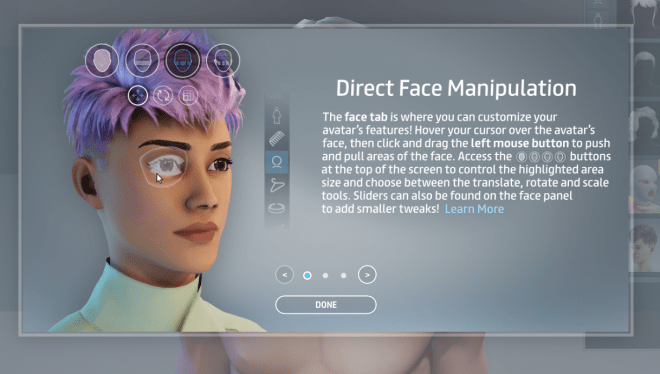
Sansar allows you to select the entire head, or just specific sections of the head/face, and then use the mouse to push and pull (translate, rotate, and scale) areas to completely customize the head of your avatar. Here’s a short video of what the face/head customization features look like (and, as I said, if you’re interested, you can download and install Sansar yourself and play around with it; you can run the client software without a VR headset, on your Windows desktop PC).
Now, compare Sansar’s tools with how InZOI has approached the problem: instead of giving you the translate, rotate, and scale options, you simply click on the white dots and drag on parts of the head and face to adjust them. (Also note the much higher level of detail in the avatar, erm, ZOI. We’ve come a long way from 2017, baby!!)
And, there are a similar set of drag-and-drop features and some sliders to customize your ZOI’s body shape (Sadly, the plug was essentially pulled on Sansar before the next planned step, a similar sort of body modification, could be coded.)
Now, imagine a metaverse platform with InZOI’s level of avatar customization. Can you see the vision? (C’mon, work with me, people!! 😉)
To wrap up, I am going to talk a bit about why I am not a fan of life simulation games like the Sims and InZOI. A key difference between a life simulation game such as InZOI, and a metaverse platform like Sansar or Second Life, is that in the former, everybody else you encounter is an NPC; there are no other real players steering ZOIs in your game! InZOI is a solitary pursuit, whereas true metaverse platforms like Second Life can be a highly social experience if you wish it to be.
Another thing I dislike about life simulation games like InZOI is that they are, by definition, games, with all the built-in limitations that games possess. Yes, you can design and build your dream house and furnish it—but only in carefully-controlled and corralled, predefined cities (you have three to choose from in InZOI at present, although I expect they will expand this over time). You do not have the blank, three-dimensional creative canvas which a true metaverse platform offers you, to be wild and crazy and build whatever you can dream of.
Many years ago, I played the Sims for something like a week, quickly got bored, and quit. I much prefer using Second Life for my creative expression, and as a temporary escape from nasty, painful, chaotic real life. The very last thing I wanted in any game was to constantly be checking various on-screen meters and gauges to see if my avatar needed cheering up, to go sleep in a virtual bed, or to run to a virtual toilet!
Yesterday, I took my new avatar (erm, ZOI) out of her house. As she was walking down the street, while I was still getting comfortable with the WASD navigation controls, she kept bumping into NPCs who were also walking by her on the sidewalk. And, of course, as programmed NPCs, some would stop and glare at her. The whole excursion landed up making me so anxious that my ZOI scurried back to the safety of her home! And frankly, it also depressed me to think that, here I was, avoiding some real-life responsibilities while basically watching my ZOI pretty much run through her day on auto-pilot. (And yes, the irony that I also essentially do this in Second Life and VRChat and other metaverse platforms is not lost on me, at all.)
I spent less than an hour in my resintalled copy of InZOI before I decided to quit. I’m in no hurry to go back. Truly, the only things I found interesting about InZOI were the avatar customization features (maybe because they reminded me of Sansar’s).
So, yeah, despite InZOI’s many shiny new features, I’m still not a fan of life simulation games. I still want the freedom of that blank creative 3D canvas which a true metaverse platform offers me, and I also want the inherently social aspect of virtual worlds and social VR/AR—to know that most of the other avatars I encounter have real-life people behind them! (And yes, I am aware that there can be bots and NPCs in spaces like Second Life and Sansar, too. That does not negate my argument that metaverse platforms are inherently designed to be social spaces.)