

PLEASE NOTE: You can find all my previous blogposts about Twitter and Mastodon here (including, of course, this one; just scroll down for the rest).

It is a grey, sullen Thursday afternoon up here in Winnipeg, and I am taking a sick day from work, feeling both literally and figuratively under the weather. I slept in till the crack of noon, dragged my raggedy ass out of bed, and my only plans for today (other than pounding out this somewhat cranky editorial while coughing up a lung) are to go to the pharmacy. So be it.
I have other blogposts that are simmering away on the back burner (go ahead, call the Metaphor Police, I dare you), but today I wanted to write about the big news in the world of social media, which is, of course, Elon Musk’s takeover of Twitter. (Standard disclaimer: Auntie Ryan has OPINIONS, and is not afraid to share them!)
Six months ago, when Elon first announced that he was buying the popular microblogging platform Twitter, I decided to set up a couple of accounts on Mastodon, a federated microblogging platform, to get a feel for the place and to set up a Plan B in case I needed to flee Twitter.
Some Mastodon statistics at the six-month mark: I have made just over 1,000 posts, and I am following a little over 700 people, of whom 343 are following me back (many added within the past week). If you follow me, I will follow you back, unless you have a blank profile (i.e., no icon, no banner, no profile, no posts, no comments).

As for Twitter, I have now unfollowed all but 25 people, plus I am following about 125 people using the highly-recommended website and app Feedbin (which I wrote about previously here). I have installed a plug-in for my WordPress blog to automatically post any new blogposts to my Mastodon account, and I am also using Renato Lond Cerqueira’s Mastodon-Twitter crossposter website to automatically crosspost any public posts (or “toots”, as they tend to call them in Mastodon) to my Twitter account. I find that between Feedbin and these two other crossposters, I have no need to actually go onto Twitter, and be subject to its algorithmic whims, trending hashtags, and advertising!
If you’ve been following the news media or social media at all this week, you will already be well aware of how things have changed (for the worse) over at Twitter since Elon trudged onsite, ridiculously lugging a kitchen sink, with a team of Tesla engineers in tow: the firings and resignations of most of the executive team; reports of workers being forced to work 12-hour days, 7 days a week, at the risk of losing their jobs if they do not meet artificially-imposed deadlines; major advertising firms advising their clients to pause advertising as Elon himself retweets QAnon conspiracy theories in response to Hillary Clinton, and bargains with Stephen King about the cost of a blue check mark (Twitter’s user profile verification symbol):

I could go on and on, but you get the idea: Elon is sowing chaos, and with recent reports that he is planning to fire half of Twitter’s workforce, the microblogging platform seems to be turning into a very different, and very worrying, place.
As I said, I was part of the wave of Twitter immigrants who came over to Mastodon six months ago, which led to a bunch of new users. The events of the past week have led to almost 200,000 new Mastodon accounts being set up October 27th, 2022, an influx that temporarily bogged down many Mastodon servers (called “instances”), and forced instance admins to scramble to add new servers and tighten up the code which runs the Mastodon service. Despite these pressures, I have found that the service works well, a testament to its distributed, federated nature.
I think I’m moving rapidly from bargaining to depression in Elisabeth Kübler-Ross’ five stages of grief, about the impending demise of Twitter (or at least, the Twitter I knew and loved). And I am still trying to decide what to do about my stub account over at Twitter, although I am now leaning towards deactivating my account and deleting it completely. The Washington Post has an excellent article outlining how to back up your Twitter data, delete your tweets, lock down your Twitter privacy and anti-harassment settings, and even deactivate and delete your Twitter account (if you hit a paywall, here’s an archived version). I will let you know what I decide, but do not be surprised if I leave Twitter completely by year’s end.
As for Twitter Spaces, Twitter’s version of the Clubhouse social audio app, I am now firmly of the opinion that social audio as a whole is dead. When I first joined Clubhouse in February, 2021, it was at the height of the hype cycle, with people desperately trying to obtain an invitation to join. Now, the few times I do go onto Clubhouse, it’s crickets. And, by and large, I have found the same with Twitter Spaces. Most social audio spaces seem to be about sports or crypto, and I’m not especially interested in either, so I will pass.
Ironically, it was as a result of a Twitter Space that I participated in that I became acquainted with Ned Segal, the Chief Financial Officer who was recently fired by Elon Musk (he still has his Twitter account up, and is still following me). I was sorry to see him go; in my chat with him, he seemed like a genuinely nice guy, and he posted an awesome chocolate chip cookie recipe to his Twitter, which I share below (in case he decides to shut down his Twitter account, which, after what happened to him, I wouldn’t blame him in the slightest for doing):
Ned Segal’s Chocolate Chip Cookie Recipe
(Note: sorry it’s not in metric; Ned’s an American! You’ll have to do the conversions yourself.)

In a large bowl, mix in 2 1/4 cups of flour and 1 teaspoon of baking soda
Beat in with handheld in order:
- 1 cup of room-temperature butter (don’t melt it)
- 1/2 cup white sugar
- 1 cup brown sugar
- 2 teaspoons vanilla extract
- 2 room-temperature eggs
- 3 cups of Nestlé’s Tollhouse semisweet chocolate chips (feel free to substitute if you’re boycotting Nestlé for being an evil company)
Put the bowl in the fridge to cool for a few hours.
Place heaping tablespoons of batter onto a baking tray, they should be tall, not flat or wide.
Bake for 9 minutes at 365°F. Every oven is different, so this is trial and error.
Remove from oven and sprinkle immediately with sea salt (I actually cheat, and add a bit of salt to the bowl before refrigeration).
Remove the cookies from the tray to cool (although they are also delicious warm, especially with a glass of cold milk to wash them down!).
I leave you with my initial thoughts and impressions of Mastodon, after having used it for six months. I have, by and large, found the difference between Twitter and Mastodon to be like night and day; I find I get much more engagement on my Mastodon posts, even though I have five times as many people following me on Twitter! (I also suspect that Twitter is probably downplaying or not displaying my posts about Mastodon, which might factor into this.)
I have found the people I interact with on Mastodon to be interesting, intelligent, lively, considerate, and (like me) opinionated. However, you will have to do a bit of work to get up to speed, like setting up a full profile with hashtags, posting an introduction post tagged #introduction, and actively searching for other people who share your interests to follow (again, using hashtags, or looking at who other people follow). I have made the conscious decision to boldly follow as many different kinds of people as possible, and I have found that when I favourite or boost somebody else’s Mastodon post, I inevitably go read their profile, and land up following them! I can always prune back later.
I have also set up my main Mastodon account so that it is “locked”, which means that other users have to make a request to follow me (I accept these requests 99% of the time, denying them only if they have zero information in their profile: no icon, no banner, no profile, no public posts, no public comments, zip, nada, bupkis). Like Twitter, the more people you follow on Mastodon, the livelier your feed! But keep in mind that there is no automatic recommendation algorithm like Twitter (some would see that as a good thing).
The two biggest issues you might face in getting started with Mastodon is picking an instance/server to join, and picking a mobile client (although you can certainly use the default Web page; it even has a TweetDeck-style interface if you like multiple columns, with your favourite hashtags in a separate column!). For example, while I do have an account on the https://scholar.social instance, just to be able to see the local feed on that server, I have my main account set up on the biggest and most popular Mastodon instance, https://mastodon.social.
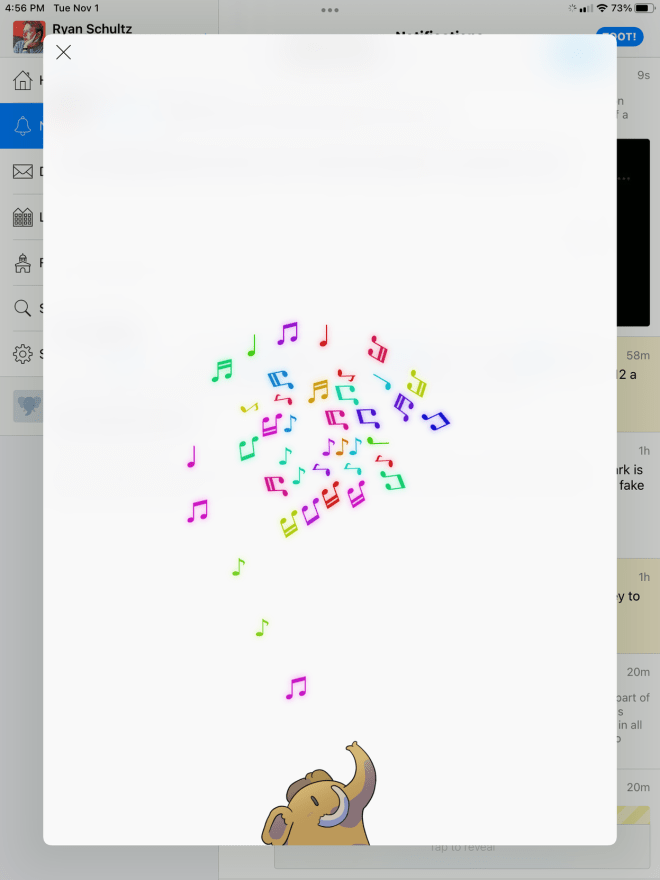
I use an iPhone and an iPad, and I have been very happy with a Mastodon client called Toot! It is very intelligently designed, and it makes clever use of animations in particular (you can turn this off, of course). My favourite part of using the Toot! Mastodon client on my iPad is this cute animation when it takes more than a few seconds to post a toot (which has been happening a lot this week, while Mastodon accepts a surge of new users). You can even toss the spiralling notes around with your finger! (I know, I know, I’m easily amused.)
One of the features of the iOS Mastodon app Toot!, which I did not know about until very recently, is that you can follow the local and federated feeds for a Mastodon instance without having to set up an account on that instance (I’m doing that right now with https://fediscience.org). If you favourite or boost a toot on an instance you’re not on, up pops a menu of your existing profiles to select one. Very cool, and it’s a great way to keep track of what’s going on in the local feed of other Mastodon instances, and (of course) finding new people to follow!
However, one of the drawbacks of Toot! is that sometimes I miss requests from other people to follow me, which can be annoying. This is easily resolved by using an alternative Mastodon client (many of which are free or cheap), or the web interface. (And, of course, you can set up your Mastodon profile so that people can follow you without sending you a request.)
So, that’s it for today. As I wrote previously, I’m still percolating. This whole Twitter/Elon Musk situation has really made me think about my social media habits, and I can see that I still need to make some more adjustments.
I love Mastodon and the community I have found there, and I’m not going back to Twitter.
UPDATE Nov. 5th, 2022: Late Thursday evening, I decided to deactivate my Twitter account, which I did Friday evening. The final straw for me was Elon’s truly appalling letter which was shared on social media and via the news media, outlining how the staff layoffs were to take place:

I vividly remember the day when I went through something like this at my first job after graduating from library school, working for Geac, a now-long-closed library automation firm. In my case, in my department of six people, two people were called into the manager’s office, one by one, and fired. I was the third person to be called in, as the first two were cleaning out their desks. I was told that I could stay. After that, I left as soon as I could, and I swore I would only work in a unionized job (and I am).
Hence, my decision to delete most of my tweets, and deactivate my account (it will be deleted in 30 days, according to Twitter). Elon Musk can go fuck himself.


