Editorial: Why Unoptimized Mesh Bodies and Content Are a Problem in Second Life—And Why Most SL Users Don’t Care

Have you joined the RyanSchultz.com Discord yet? You’re invited to be a part of the first ever cross-worlds discussion group, with over 300 people participating from every social VR platform and virtual world! More details here. 


Image of a well-optimized mesh avatar body with a lower triangle count
(from New World Notes)

I am going to broach an unpopular topic in Second Life. (Some have even warned me that I might get hate mail from some readers.)

Wagner James Au has been writing his blog about Second Life since the very beginning of the platform, and he has seen a lot come and go in his time. One of his regular rants lately has been about just how horribly unoptimized and inefficient many of the modern mesh avatar bodies are in Second Life. (Frankly, it’s not just mesh bodies; there is quite a bit of other poorly-constructed content in SL—houses, furniture, decorations, etc.—with sky-high rendering costs. Part of the problem is that Linden Lab doesn’t want to break any old content if they can help it.)

Why is this so important? Well, the more complex your avatar is, the more effort it takes for the graphics card in your computer to calculate and display what you see correctly on your screen. And it’s not just your mesh avatar; it’s everybody else’s mesh avatar who is on the same sim as you, plus all the scenery around you, too! Every Second Life user has experienced irritating delays in rendering scenery when they first spawn on a new sim, and significant lag at busy events where there a large number of avatars to render. These problems have been going on for years and years now.

The problem is that Wagner is pretty much beating a dead horse with his critiques. Most Second Life users care only about how good their avatar looks, and they don’t know (or don’t care) about how much unoptimized mesh content negatively impacts SL and other users, particularly those on older, slower computers. I myself have an absolute beast of a gaming computer, built especially to support my Oculus Rift VR headset and to run VR games and apps at the requisite 90 frames per second (to avoid VR-induced nausea). I routinely run my Firestorm viewer for SL at the maximum, Ultra quality settings, and usually my computer handles everything just fine.

Linden Lab well knows that this can be a problem, and some years ago they introduced something called the Avatar Rendering Cost (ARC for short). Here’s a summary of how ARC is calculated. Basically, it is a figure calculated for each avatar on a sim, based on whether they have a classic or mesh avatar, what they are wearing (clothes, hair, shoes, accessories), etc. Showing the ARC on yourself and other avatars is easy to turn on in Firestorm: just press Ctrl-P to bring up the Preferences panel, click on the General tab on the top left-hand side, and check the box next to “Show avatar complexity”:

Many SL viewers will allow you to automatically derender avatars whose ARC is above a certain limit (which means offenders will appear as the so-called “jelly dolls”). This feature can improve Second Life performance significantly for some users. (Like I said, I have my settings adjusted to properly view everybody around me on a sim, regardless of how high their ARC is. I want to see what everybody is wearing, dammit! I often find new stores to visit and new things to buy by doing a right click/inspect on avatars around me. I can’t do that if they are derendered! But obviously, there is a significant rendering cost on my computer, especially at busy events.)

But today’s discussion of this topic on the #second-life channel on the RyanSchultz.com Discord server really brought home to me just how serious the problem of unoptimized, inefficient mesh can be in SL. Recently, a Second Life vlogger named Cassie Middles created a chart showing how many triangles make up each of the popular mesh bodies. (Here’s a direct link to the Google spreadsheet she created. The higher the number of triangles, the more complex the object, and the harder your computer graphics card has to work in order to render it properly. As well as everybody else’s computer.)

One of the mind-blowing facts I learned today is that the brand new Legacy mesh body (just the naked body with hands and feet, without any clothes, shoes, jewelry, a mesh head, hair, etc.) comes out to a whopping 794,368 triangles!

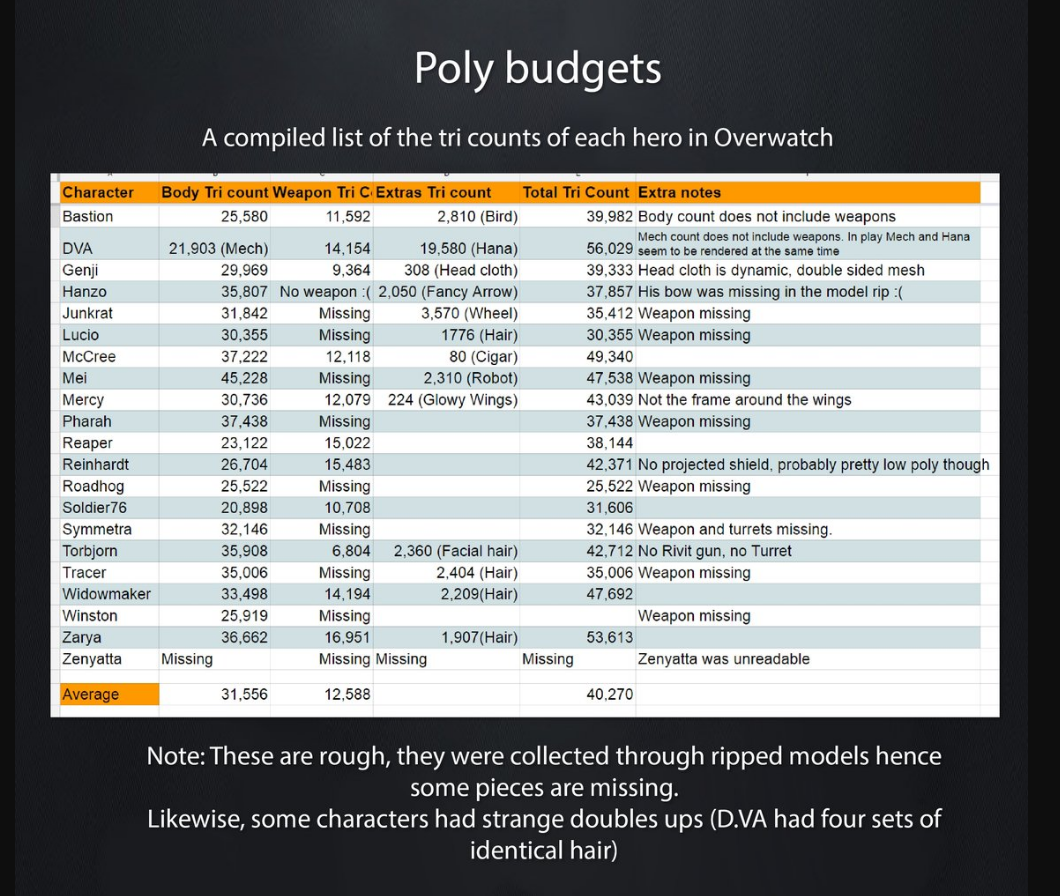
To put that astronomical figure into some perspective, someone said that that number is significantly higher than the rendering cost of an entire match of Overwatch players (two teams of six avatars each, at an average triangle count of 40,270 triangles per character, for a total of 483,240 triangles). That is truly insane! And the feet alone on the new Legacy mesh body come to 380,368 triangles! Mind you, most games are deliberately designed to be as optimized as possible, but nobody needs that level of complexity! It is complete overkill.

But, as I said, writing about this is kind of like closing the barn door after the horse has bolted. There is really no incentive for mesh body makers (and other mesh content makers) to create and sell better-optimized mesh in Second Life, and no penalty if they don’t. Linden Lab does not ban or restrict avatars for having very high rendering costs. For example, here is one outfit I put together for my main avatar, Vanity Fair, which has a total Avatar Rendering Cost of 702,597! This means that, when I wear this lovely outfit to a place like Frank’s Jazz Club, I am pretty much seen as a jelly doll (i.e. derendered) by everybody around me. In other words, I am only dressing to be seen by me.

If I take off the three sets of shimmery flexiprims that are part of the skirt of this beautiful gown, the ARC drops to 108,365. If I remove the jewelry, the ARC goes down to a quite reasonable 59,575 (some older jewelry in particular can be quite badly optimized):

Even making these simple changes to an outfit can make a big difference to performance (for you and others), especially at crowded events.

So, even though it might be a losing battle, I might just decide to add my voice to Wagner’s about the proper optimization of mesh content in Second Life. I still think it’s a losing battle, though. Most SL consumers could care less.

I think that the best that we can do at this stage is two things:

  1. Promote awareness of the problems of unoptimized, inefficent content among Second Life consumers (for example, including triangle counts or some other complexity measurement in SL Marketplace listings of products);
  2. Educate SL content creators to make more efficient mesh by using proper decimation and other techniques in tools such as Maya, 3ds Max, and Blender.

Yes, it’s an uphill battle, but it’s worth fighting for a better-performing Second Life for everybody, don’t you agree?

Doing Drag in Second Life: Part III

If you can’t love yourself, how in the hell are you gonna love somebody else! Can I get an amen?

—RuPaul Charles, RuPaul’s Drag Race

My favourite reality TV show is RuPaul’s Drag Race! I never fail to miss a new episode. Currently I’m enjoying the very first season of the U.K. version of the show. I’m also a fan of the alternative, horror-themed drag TV show Dragula. I’m just so taken with the Charisma, Uniqueness, Nerve, and Talent demonstrated by the RPDR contestants (or, in the case of Dragula, the four tenets of Drag, Filth, Horror, and Glamour).

Given my hobby of designing complete avatar looks in Second Life, perhaps it’s not so surprising that I have written before on this blog about creating several drag queen avatar looks here, here, and here. (“Girl, you betta work!“, as RuPaul herself would say…)

So, when I found out that the edgy fashion store Boys to the Bone had an October 2019 group gift of a black mesh ballgown with a plunging neckline, designed specifically for male avatars, I decided to build a complete look around it! The Morticia gown comes in three shades of black: light black, dark black, and shiny black. Here my drag queen avatar, MissDrag, is wearing the dark black gown:

The Morticia gown is sized to fit the Belleza Jake mesh body, and I had to fiddle a bit with the body sliders and alpha sections on my Altamura Romeo mesh body to make it work. I still had a bit of a problem at the back of the neckline, but the Nikki wig covers that area quite nicely!

The fabulous drag queen wig selection at ZsaZsa’s House of Beauty

This avatar is wearing:

  • Mesh Head and Body, Including Lipstick and Nailpolish: Romeo by Altamura (a past Valentine’s Day group gift; the Altamura group costs L$50 to join; you will have to buy and install the Omega system kit on the Romeo body to be able to apply the eye makeup below (it’s for sale for L$99 at this exact SLURL)
  • Dress: Morticia gown in dark black (group gift from Boys to the Bone; the BTTB group costs L$100 to join)
  • Jewelry: Ophira by Lazuri (free, from the Free Dove at this exact SLURL)
  • Mesh Feet and Shoes (Not Shown): black chained sandal by Ydea (free from The Free Dove at this exact SLURL; just the thing to replace those masculine feet!)
  • Wig: Nikki wig in red (naturals pack; L$235 from ZsaZsa’s House of Beauty, the finest collection of drag queen wigs on the grid!)
  • Eye Makeup: Vanilla makeup set; L$200 from Dotty’s Secret (the best drag queen makeup store in Second Life)

TOTAL COST FOR THIS AVATAR: Only L$684!

Pictures were taken at ZsaZsa’s House of Beauty and Dotty’s Secret.

Linux Support in Social VR Platforms and Virtual Worlds

Have you joined the RyanSchultz.com Discord yet? You’re invited to be a part of the first ever cross-worlds discussion group, with over 300 people participating from every social VR platform and virtual world! More details here. 


I have been home sick yesterday and today, venturing out today only for a doctor’s appointment, and yesterday to go vote in Canada’s federal election. (Well, I got what I wanted: a Liberal minority government with the NDP holding the balance of power, and Maxime Bernier’s ass handed to him on a platter. It’s certainly going to be an interesting next few years in federal politics!)

There has been a fascinating discussion taking place on the RyanSchultz.com Discord server about Linux support in various social VR/virtual worlds. Here’s some of what I learned (please note that these are only based on what people have said on my Discord, and that you should always refer to the companies’ websites to get the authoritative final word on Linux support):

  • While Palmer Luckey originally pledged to support Linux for the Oculus VR headsets, the company later abandoned that idea. However, Vive/Valve does have some Linux support (you can Google for the necessary information).
  • The Sansar client only runs on Windows, and a couple of people who have tried to run it on Linux through Steam Play (an emulator from Valve that allows you to play Windows games on Linux), reported that it didn’t work.
  • VRChat is, however, reported to work on Linux via Steam Play, with a few issues, according to the ProtonDB compatibility website.
  • Although High Fidelity technically supports Linux, in actual fact there is no Linux client available to download from their website. (You can, of course, host your own HiFi world server using Linux.) But you do have to build the Linux client application from HiFi’s code base yourself (here’s their Linux Build Guide), and according to various reports on their user forums, some people have had problems doing so. High Fidelity admitted that their in-house Linux support has deteriorated as far back as 2016, so basically you’re on your own. Given their recent pivot towards remote teams use for the enterprise, future support for Linux looks even more unlikely. However, the software is open source, so perhaps some enterprising volunteers will get it to work.
  • Sinespace has a Linux client, as well as a web browser client that will work in Linux. They have a guide for Linux users.
  • Second Life and its OpenSim variants do have Linux clients. The most popular Linux client is probably Firestorm.
  • One person reported being able to run Active Worlds and There.com with WINE (a Windows emulator for Windows).
  • Mozilla Hubs, being web browser based, works on Linux.
  • JanusVR works with Linux, both in browser and via their downloadable client.

And that’s a summary of all the information I have right now. Please feel free to post a comment with any updates, corrections, or additional information, thanks!

Second Life Steals, Deals, and Freebies: The Best Freebies from SL’s Top Haunted Places Tour and Hunt

The tenth annual SL’s Top Haunted Places Tour and Hunt is on in Second Life, with no less than 118 stops, as of today! (The organizers keep adding new ones to the list.) At most stops, there is at least one free hunt gift to find, and many stops have more than one. And yes, I have visited every single one of them, just so I can tell you about the best freebies you can find on this year’s Tour and Hunt!

I’ve already shared a couple of prizes from stops on the Tour and Hunt previously on my blog:

The webbed sneakers are from the Oubliette booth at Trick or Treat Lane (each vendor booth has a free gift, some are hidden and some aren’t). The black printed T-shirt is from the Haunted Frolic maze (it comes in a variety of male and female sizes to fit most mesh bodies).

But I have a few more hunt freebies to share with you!

If you do the hunt at the Halloween Haunted House at Summit Nights, you can pick up several Halloween top hats adorned with skeletons:

The Boiling Points 8th Annual Haunted Hunt: The Demented Circus (set up by the Spider Productions store) beats all the other hunts by offering 36 different free hunt gifts! Just go to the store (here’s the SLURL) and click on the teleporter at the spawn point to get to the hunt area. Warning: I found that the teleporter was a bit finicky, so you might have to try it a few times to get it to work properly. Keep clicking!

Once you arrive at the hunt site, click on the large sign at the entrance to get two notecards, one with the hunt rules and a second with the hunt hints to find 36 poison candy apples. The first one is easy; it’s sitting right next to the sign! (The prize is some lovely abstract art for your home.)

I found this to be a very challenging but rewarding hunt! I spent at least an hour and half on this one hunt alone! Some of those candy apples are fiendishly well hidden! What I liked about this hunt is that some of the prizes were not your typical Halloween fare. For example, one prize was this lovely modern fireplace, which looks great in my new Linden Home:

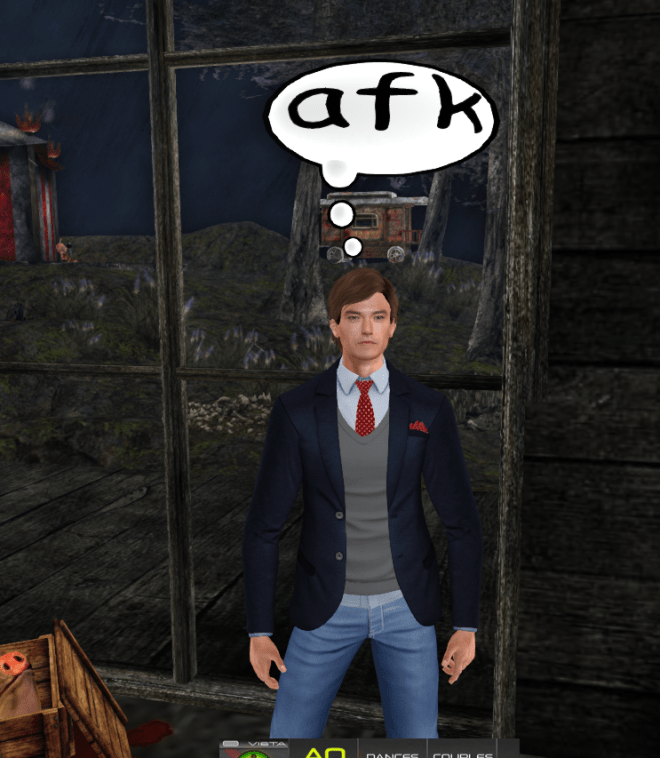
Another prize was this cute, three-dimensional AFK (Away From Keyboard) thought bubble! You can read it from the front and the back! It’s perfect for when you need to step away from the keyboard for a few minutes (or hours, days, weeks…).

But I saved the very best for last! Complete the hunt at JTCrusher’s Haunted Slimy Lava Graveyard and click on the women’s gift box, and you get no less than eleven animated dance attachments with music! (The men’s hunt gift is a pair of gravedigger shorts in various sizes to fit most men’s mesh bodies. For some strange reason, the women’s hunt box also has three patio umbrellas.)

Here’s a sample dance, one that everybody knows well (and some of you might just be sick to death of before Halloween is over):

But it’s not just Michael Jackson’s Thriller! There are ten other dances, too! Here’s the full list of dance animations in the gift box:

  • Dark Horse by Katy Perry
  • Roar by Katy Perry
  • Dancing Queen by Abba
  • You Sexy Thing by Hot Chocolate
  • Booty Man by Tim Wilson (and it’s not just a clip—it’s the WHOLE. DAMN. SONG.)
  • Caribbean Queen by Billy Ocean
  • Macarena by Los Del Rio
  • It’s Raining Men by the Weather Girls (complete with “raining men” particle effects!)
  • Shake That by Eminem ft. Nate Dogg
  • This Is Halloween
  • Thriller by Michael Jackson

So get out there and start hunting! These are just five stops out of 118! SL’s Top Haunted Places Tour and Hunt ends on Oct. 31st, although some stops will run into early November. To get a complete list of stops, go to the starting point and click on the poster to get the first of six notecards describing each of the 118 stops on the Tour and Hunt:

There are links to notecards numbers two through six at the bottom of the first notecard. You can skip around and do the stops in any order.

Happy Halloween hunting!