Dr. Kristin Drogos and Michael Zhang are conducting academic research on interpersonal relationships on the social VR platform AltspaceVR. Michael asks:
Have you used AltspaceVR for over six months and are 18 years or older? We’re conducting a study on social VR relationships at the University of Michigan and would love for you to participate. All you need to do is complete a 10 to 15-minute survey on a laptop or desktop computer. Optional 30-minute interview at the end. Thanks!
If you are interested, here is a link to the survey. If you have used AltspaceVR for more than six months, and are over 18, please consider taking part, thanks!
Please note that I am taking the entire month of July off as a self-imposed vacation from the blog so I can focus on my other work, except for sponsored blogposts, and the occasional exception such as this post. See you in August!
There’s yet another inexpensive Bento, Bakes on Mesh full-body (i.e. head and body) male mesh avatar, this time from Altamura. If you join the TeleportHub.com group for only L$10, you can pick up the Stay With Me body. The gift panel is located close to the entrance of the Altamura store:
You can also pick up a free male and female Bakes-on-Mesh skins as part of a free Bakes on Mesh package available from a panel near the rear of the rather cavernous Altamura store (here’s the exact SLURL; use the Show on Map feature and follow the red arrow):
Here’s what the Stay With Me body looks like, right out of the box, without any adjustments to any of the head and body sliders. No skin comes with this body, so I used the Delphinus pale male skin which was part of the Altamura Bakes on Mesh package above.
Unfortunately, this body does NOT come with a HUD with alpha sections, so you are going to have to rely on clothing that does come with alpha sections (such as the blue swimsuit, which is part of the Alejandro starter avatar look already in your SL inventory). The Brad hair in rust brown shown here was a recent Father’s Day hunt gift from Alii & Ali Designs.
For some reason, the toenails on this body are a separate attachment, but not the fingernails! Also, the eyebrows on the male Delphinus skin, which comes in the Altamura Bakes on Mesh package above, are so pale that you might want to invest in a pair of system/Bakes on Mesh eyebrows to complete this particular look! (Or use a different BoM male skin.)
All told, it’s a good-looking, fully-adjustable male mesh body that easily takes Bakes on Mesh skins without having to purchase an Omega kit, so you might be quite happy with this bargain.
The lack of an alpha section HUD is the deal-breaker for me, personally; I’d much rather use a mesh body that has that feature, since it would allow me to wear clothing designed for other male mesh bodies. However, I have been pleased to discover that more and more Second Life stores are now creating and selling clothing specifically made to fit male and female Altamura mesh avatars!
UPDATE July 21st, 2020: I wanted to update this blogpost to show you the Stay With Me mesh avatar with one of the skins available from a dollarbie set from Sweet’s on the SL Marketplace, which I think turned out quite well:
Note that if you are looking for a free set of alphas to use with this body (since it does not come with a HUD for alpha sections), you can pick up a free set from Little Black Dress at this SLURL (click on the bag on the floor). Cat Pink SL has also put together a helpful video with other places you can pick up free or L$1 alphas for this body:
Please note that I am taking the entire month of July off as a self-imposed vacation from the blog so I can focus on my other work, except for sponsored blogposts, and the occasional exception such as this post. See you in August!
I stumbled across the virtual womenswear store DM in my usual peripatetic travels around the Second Life grid, which I had never been to before, and I wanted to share with you some of their plentiful group gifts!
Here is the exact SLURL to the group gifts wall; just click the swimsuit panel in the picture below to get a link in local chat, to join their store group for free (you won’t be able to do a keyword search under Groups for “DM” because it’s too short a word). There are group gifts for members of the No Cabide and Second Life Frees & Offers groups, plus a gift box which includes all the previous DM group gifts from 2017, 2018, and 2019! As a freebie fashionista, I absolutely love it when stores are so generous, and make picking up all their previous group gifts so very efficient!
The current group gift from DM is a relative rarity on the grid: a free women’s swimsuit, that actually comes in a size which fits Altamura mesh bodies! (The tops of most swimsuits created for Maitreya Lara bodies tend to fit Altamura bodies well, but the bottom half usually doesn’t fit properly.) This Mona one-piece swimsuit comes with a HUD with six different cheerful patterns as shown. If you have a freebie Altamura body (or one you bought), this is definitely a must-get item!
The Mona swimsuit comes in the following sizes: Altamura; Belleza Venus, Isis, and Freya; eBody Curvy; Legacy Perky; Maitreya Lara; Signature Alice; Slink Hourglass and Physique; and Tonic Curvy, Minim and Fine.
Another DM group gift is the Luana outfit as shown, including a pink, transparent top with a floral pattern, the distressed skinny jeans, and the high-heeled sandals:
This Candy T-shirt dress comes with a HUD with six different slogans:
Here is the Melina jumpsuit outfit, which includes the matching pumps shown. The HUD offers three different colours for both the jumpsuit and the shoes:
The Nanda set consists of a casual maxiskirt and a matching crocheted top. The included HUD gives you five different colours and patterns for each:
There are many other group gifts from DM; this is just a representative sample.
This avatar is also wearing:
Mesh Head: the Giselle Bento mesh head by Altamura (no longer available for free; this was an Altamura gift from Christmas 2017 at the eBENTO event, and you had to join the Altamura group for L$50 to get it).
Mesh Body: the Jenny Bento mesh body by Altamura (this was a free gift from the 2017 Women Only Hunt, and on this version only, you can remove the head and replace it with any other mesh head, as I did here with the Giselle head. Please note that the Jenny free mesh body is now available at the Freebie Megastore at London City (more information here), but you cannot remove the head on the newer free version.
Hair: the Hurrah hairstyle from Ade, a free gift from the 2019 Hair Fair.
TOTAL COST FOR THESE AVATAR LOOKS: Only L$50! (the Altamura group join fee at the time I joined; the Altamura group now costs L$100 to join, but it’s still a good deal as you can pick up all their freebie male and female bodies. as well as obtain group discounts on Altamura products at various shopping events)
Please note that I am taking the entire month of July off as a self-imposed vacation from the blog so I can focus on my other work, except for sponsored blogposts, plus occasional breaking news such as this. See you in August!
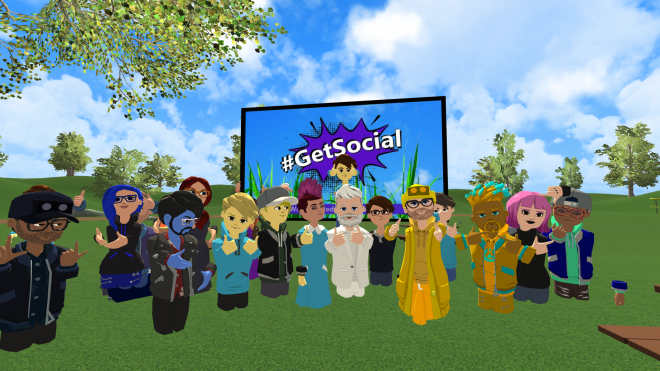
The ever-reliable members of the RyanSchultz.com Discord (my eyes and ears to the multiverse and its happenings!) informed me that, as of 9:00 a.m. Eastern time, AltspaceVR finally released their new, updated avatars, and they are definite improvement over the first-generation avatars. Michael Zhang shared a picture with us of his AltspaceVR avatar’s transformation from one year to the next:
Michael Zhang (upper left) and three pictures showing how his AltspaceVR avatar has changed from year to year (source: Michael Zhang)
So, I went into AltspaceVR today to check out the new avatars. But, before I talk about the avatar update, I wanted to share with you a few user interface problems I encountered.
One of the things that I do find rather irritating about AltspaceVR is that there seems to be no easy way to switch from VR mode to flatscreen mode. I have uninstalled and reinstalled the client software, and if you already have a VR headset set up (like my Oculus Rift), then the VR client is automatically loaded, and I cannot seem to find any switch that will allow me to switch back and forth between flatscreen and VR modes (the best example of this ability is Sansar, which seamlessly switches back and forth between VR and flatscreen mode when I put on and take off my Rift, including changing the audio and microphone locations).
Why is this so important? Well, it’s important to me because I find it far easier to take screenshots from a flatscreen display.
Even more irritating, you cannot use the built-in camera tool to take any pictures of the new avatar customization tools; the camera disappears completely when you load up the main menu where the customization features are found.
In the end, I was forced to take off my Rift, hold it aloft, very precisely, with one hand so that the internal sensor is blocked (so it thinks it’s still on my head), pivot it so that whatever image I want to take a screenshot of is centred on my desktop monitor (which mirrors what I see looking forward in the headset), and then hit the PrintScreen key with my other hand, to capture the screenshot using SnagIt.
It is a futzy workaround and it is a MAJOR. PAIN. IN. THE. ASS. whenever I want to demonstrate something in the AltspaceVR interface. Why you making this blogger’s job harder, Altspace?!??
UPDATE July 16th, 2020: I have been informed by Michael Zhang that the easiest option to switch from VR to 2D is simply to unplug the VR headset’s USB-C or the HDMI cable from your computer, and it will by default switch to flatscreen mode. Thank you for this tip, Michael!
Also, despite my best efforts, the in-world camera automatically takes selfies, and I could not figure out how to turn the camera around to take pictures of what I was seeing! (I’m sure there exists a way, but I couldn’t figure it out, and a quick Google search didn’t help me, either. In this instance, I assume the problem is with me, and not with the client. But if the AltspaceVR in-world camera only takes selfie shots, then that’s yet another criticism I have about the platform.)
UPDATE July 16th, 2020: It would appear that AltspaceVR is aware of the new bugs in the in-world camera tool:
Hey everyone!
Thanks very much for all of the feedback about the changes to the camera. We understand that this is a useful tool and our team is currently investigating options and working on a fix. To shed some additional light on the change: the PC-only camera code stopped working when we introduced some changes to the way we draw your first-person avatar. The same bug is affecting the JimmyCam, as well, causing you to look headless when you look at yourself!
We’ll continue to investigate options, and are currently working on a hotfix that will enable you to take front-facing photos.
In the meantime, the selfie camera and the screenshot tool are still available for use. (Remember, in 2D mode on your PC you can hide the menu UI by typing Ctrl+Alt+P; and on Windows 10 you can take screenshots easily with the windows key+print screen.) To view, download, and share your photos log into your account at altvr.com and go to the “Photos” tab.
Thanks again for sharing your thoughts with our team!
Anyway, back to the main topic of this blogpost: the new AltspaceVR avatars.
Here is what my new, default avatar looked like before I started working on him, taken with the previously-mentioned selfie camera (I assume that this was a randomly-generated starter avatar look):
And here is what I came up with, after spending about ten minutes of fiddling with all the options. He looks a lot more like the real-life me (but he’s still too thin):
Yes, the new avatars are much more customizable than the old ones. No, they still do not have arms or legs, probably to avoid dealing with IK (inverse kinematics) issues.
I went through all the various avatar customization options and I must confess that I am a bit disappointed. The good news is that there are so many different kinds of eyes and hair styles and skin colours and hair colours/dyes to choose from! But only six types of noses, all of which are on the small side? Only three jaw shapes to choose from? Only two styles of mouths, one obviously male and one obviously female? While what’s there allows you to get pretty creative, and it’s a definite improvement over the old system, I still think that there are too many restrictions on what you can do. (If you want to be a furry, you are definitely out of luck, although a green space alien is possible, as long as she or he is humanoid.)
I know that one of the goals the AltspaceVR avatar redesign team was aiming for was for all the avatars to have a somewhat consistent look to them, while allowing for personal variations in looks, skin tones, hairstyles, and clothing (no need to worry about shoes, since there are no feet). Also, they obviously did not want to have higher-poly user avatars that would make the rendering of AltspaceVR more difficult on lower-powered devices such as the wireless Oculus Go and Oculus Quest. And in both of these goals, I feel that the Altspace team succeeded; this was a definite (and very welcome) upgrade.
A look at the new AltspaceVR avatars (source: Twitter)A gathering of the new avatars in the #GetSocial world (source: Twitter)
In summary, I think most AltspaceVR users will be happy with this upgrade. And it addresses one of my pet peeves about the platform to date: the old, low-poly, dreadfully cartoony avatars are now banished. Hallelujah!