Raspberry Dream Labs is bringing to the world its brainchild –– the social WebXR event platform for progressive arts & entertainment – Raspberry Dream Land! A mecca of electronic music and alternative nights, creative hub and multisensory playroom opens its doors with an invite-only soft launch event in all major regions worldwide.
Our platform celebrates the solarpunk future coming into existence by uniting art, technology, sustainability and cyber-sexuality. Lose your avatar on the dance circuit to the live deep techno tunes, join the Central Plaza stage for the artists and brand talks, discover community generated 3D worlds, and experience the one-of-a-kind ‘Sense Magick’ Cyber-Tantra Ritual in the Underworld, the erotic playspace of the Future.
There’s not a whole lot of detail on the website so far, but the project has already attracted a number of artists:
Some of the artists associated with Raspberry Dream Land
There’s also a statement from the founder:
From multisensory academic VR study, 25+ IRL and VR events to [the] world’s 1st Burning Man in VR – over the past two years at Raspberry Dream Labs we explored how the potential of technologies-of-today can redefine self-expression, social entertainment and intimate connections.
While the interests in our events kept growing, we faced censorship from existing VR platforms which made us realize that while there is growing interest from users across the globe, there is no such platform that caters to these needs.
We are excited about our mission and the societal impact of what RD Land is going to unlock.
—Angelina Aleksandrovich, Founder, CEO and Creative Director of Raspberry Dream Labs
New Art City is a virtual world platform created by students at San José State University (SJSU) in San Jose, California, which is intended to be a virtual gallery and exhibition toolkit for online art exhibitions. As SJSU’s Jon Oakes told me, “It’s like [Mozilla] Hubs, but for artists.”
New Art City is a virtual exhibition platform for new media art with a focus on co-presence and experiencing digital art together. Shows are real-time multiplayer and accessed using a web browser on computer or mobile device, with no need to register, install extra software or enter any personal information. Using built-in tools to manage artworks and room layouts, curators and organizers can create a show and hold a virtual exhibition online. Participants can attend virtual openings together, chat and see each other moving around the space while experiencing digital art in its native format.
In its mission statement, New Art City’s curation and product design prioritize those who are disadvantaged by structural injustice. An inclusive and redistributive community is as important to this project as the toolkit itself, and the platform seeks to support artists who face barriers in the traditional art world, promoting and amplifying works by queer artists and artists of colour.
Galleries are accessible via the New Art City website, and run inside your web browser (Chrome is the preferred browser). New Art City is not yet compatible with VR headsets, but the creators have built it in a way where this will be possible in the future.
Examples of galleries in New Art City
There are already dozens of exhibits available for you to visit. New Art City is currently in private beta, and access to exhibitors is granted on an invite-only basis. They are planning to launch open signups soon, but in the meantime you may submit a proposal for access here.
Yesterday, Facebook announced their entry into what I collectively term the YARTVRA (Yet Another Remote Teamwork Virtual Reality App) marketplace, a product called Horizon Workrooms. Here’s the promotional video for this new social VR platform for the workplace:
When you choose to collaborate with your coworkers in Workrooms, you should feel in control of your experience, and we built Workrooms with privacy and safety in mind.
Workrooms will not use your work conversations and materials to inform ads on Facebook. The audio contents of your meeting are processed on Facebook servers but not stored, unless someone records and sends us a clip as part of a report. In this case, we’ll use the information to take appropriate action and then delete the recordings. Finally, Passthrough processes images and videos of your physical environment from the device sensors locally. Facebook and third-party apps do not access, view, or use these images or videos to target ads. Other people are not able to see your computer screen in Workrooms unless you choose to share it, and the permissions you grant for the Oculus Remote Desktop app are only used for the purposes of allowing streaming from your computer to your headset.
In addition to keeping your information secure, we want everyone to feel safe while collaborating in Workrooms. That’s why anyone who signs up for Workrooms must agree to follow our Facebook Community Standards and Conduct in VR Policy. If other members or content in the workroom violate these policies, you can always contact the team admin who can take action such as removing someone from the Workrooms team. You can also report an entire Workrooms team if you think it’s not following our policies. And If you’re in VR with people who are bothering you, you can report them using the Oculus reporting tool and include evidence for us to review.
Using Workrooms requires a Workrooms account, which is separate from your Oculus or Facebook accounts, although your Oculus username may be visible to other users in some cases—for example if someone reports you for violating our policies and your username appears in the tool. And to experience Workrooms in VR, you’ll need to access the app on Quest 2, which requires a Facebook login. That being said, your use of Workrooms will not make any updates to your Facebook profile or timeline unless you choose to do so.
While offering a free collaborative VR platform on a low-cost, wireless VR headset will certainly be tempting to businesses (and it may sound a death knell to some YARTVRA competitors out there), the requirement to set up a personal account on the Facebook social network to use Horizon Workrooms is going to continue to be a stumbling block for many of the companies that Facebook is targeting with this product (and the bigger the company, the more likely that their legal department is going to have objections).
Still, there are several notable features in Horizon Workrooms. Instead of using an awkward workaround to tap at a virtual keyboard, you can bring your physical desk and a compatible tracked keyboard, where you can see them sitting on the virtual meeting table in front of you. Road to VR reports:
The app includes a fully functional virtual desktop, which leverages a companion app installed on your PC or Mac to stream your computer’s desktop to a virtual screen in front of you. This means you can continue to access your computer even while you’re inside the headset, and you can even share your screen with others in the room.
To make it easier to use your real keyboard that’s on the desk in front of you, Horizon Workrooms supports keyboard tracking which allows it to detect a handful of specific keyboards, and create a virtual representation of them so that you can see and type on without being ‘blinded’ by the headset.
Right now Horizon Workrooms only supports Macbook keyboards, the Apple Magic keyboard, and the Logitech K830, though the company says they’re working to support more in the future.
If you don’t happen to have one of these keyboards luckily there’s a backup option. You can enable a ‘desk passthrough’ view which cuts out a portion of the virtual desk in front of you to show your actual hands on your actual keyboard. I was surprised how well it worked. While the passthrough video quality isn’t good enough to easily make out the letters on individual keys, for proficient typists it at least makes it easy to keep your hands properly aligned and prevents blindly reaching around for your keyboard. Now if only they could support coffee mug tracking too….
While it’s nice to have your usual desktop right in front of you—and all of the productivity capabilities that confers—it’s far from a perfect replacement for your actual PC. Latency between the PC and headset is surprisingly high, making mouse movements and keyboard input much more sluggish than you’re used to (especially if you have a high refresh rate monitor). Hopefully this is something they can improve going forward.
A look at how you can integrate your real-life keyboard into Horizon Workrooms (image source)
Anybody who has tried to use what Philip Rosedale has pejoratively called a “marimba keyboard” (i.e. where you use a mallet-like device to awkwardly type on a virtual keyboard in VR), can immediately see the benefits of this!
Horizon Workrooms also features spatial audio (is this the same as High Fidelity’s product, I wonder?), as well as “new and improved” Oculus Avatars, which are still upper-body only. Other features include whiteboards, where you can flip your Oculus Touch hand controller around and use it as a whiteboard marker. In fact, once you enable hand tracking in the Quest 2, you probably won’t need to use the hand controllers as much, anyway. According to the official announcement:
Workrooms is one of our first experiences that was designed from the start to use your hands, and not controllers, as your primary input. This helps to create a more natural and expressive social experience and lets you switch more easily between physical tools like your keyboard and controllers when needed. (To ensure the best experience, you’ll need to enable hand tracking to use Workrooms.)
Furthermore, Facebook wants to make Horizon Workrooms features available for other Oculus Quest developers to use:
We hope that developers are excited to use many of the same features seen in Workrooms in their own apps, and we’re working hard to bring them to our platform as well. You can already start by using our hand tracking and spatial audio features in your own apps today. And we’re working to bring avatars, Passthrough, mixed-reality desk, and tracked keyboard capabilities to the platform too. We’re excited to continue growing the VR for work ecosystem, and we hope that Workrooms serves as inspiration for how these features can work together.
We think VR will fundamentally transform the way we work as a new computing platform, defying distance to help people collaborate better from anywhere. Horizon Workrooms is a big first step towards this vision, and we look forward to hearing your feedback.
I note with interest that Horizon Workrooms does not appear to be available for the Oculus Rift tethered VR headset, which Facebook has already discontinued in favour of the Oculus Quest 2. I wonder why; no doubt there are still plenty of Oculus Rifts in use. Perhaps Facebook judged that it was not worth the extra work to make it happen, deciding instead to go all-in on the Oculus Quest ecosystem. (Also, the percentage of businesses using Rifts is probably pretty small.)
Horizon Workrooms looks to be a very useful and fully-featured product, which businesses and other organizations can use for free. However, we all already know, after numerous past Facebook privacy controversies, if it’s “free”, you are the product (even with Facebook’s assurances that it won’t use that data it collects to target advertising to you). I will continue to watch and report from the sidelines.
We wanted to try it, so we reached out to Oculus since we only have Oculus for Business headsets, and they said it wasn’t available for OfB, which seems to kind of defeat the purpose of this.
The Fifty Linden Fridays shopping event, one of the longest-running in Second Life, is celebrating its 12th birthday with a special birthday bash on a dedicated sim, where almost every vendor booth has a free birthday gift for you! Simply join the Fifty Linden Fridays group for free to vacuum up all the freebies!
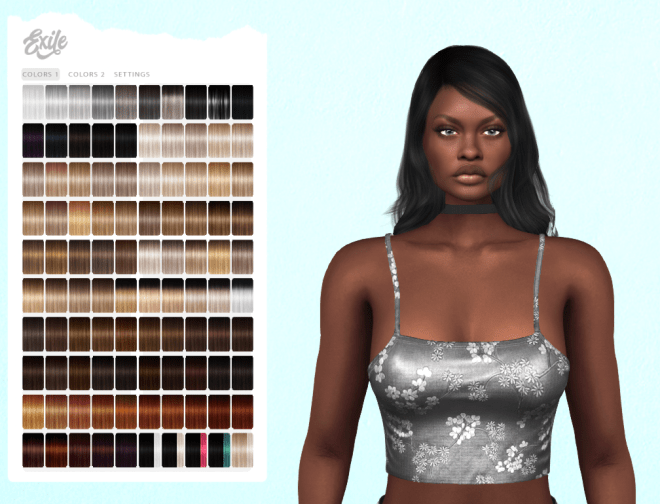
Here are a sampling of some of the gifts which caught my eye. First up is a hairstyle from Exile Called Erin, which comes in a fatpack of no less than 200 different textures! The lovely Blossom tank top from Flora comes in six different colours.
This Dylan hairstyle is one of three different women’s hair fatpacks available from the Elikatira booth at the FLF Birthday Bash! Moesha is also wearing the gift from Cynful, this purple tube top:
Here’s another one of the Elikatira group gifts, the Penny hairstyle, shown with the present from the Blueberry booth, a fatpack of crop tops with an optional bra underneath:
Now Moesha models the gift from Pixicat, this animal-print River minidress, plus the Happy Glasses from Balaclava!, which come in three different colours.
You can pick up a complete fatpack of these Shelbie platform pumps from Phedora:
The gift from Valentina E. is this green plaid dress called Gigi:
The present from the Luas booth is this tie-dyed yellow bikini:
Finally, the gift from Salem is this beautiful Artemis circlet, which comes with a HUD with 28 different gemstones and eight different metal textures:
If you’re interested in the history of this popular shopping event, Wagner James Au interviews the founder of Fifty Linden Fridays on his blog here.
Here’s your taxi to the Fifty Linden Fridays Birthday Bash sim! As you can imagine, the sim is jam-packed, so you might want to wait a week or two before you try to get in (the event runs until September 3rd, 2021, so you’ve got lots of time to pick up all the birthday presents). Happy freebie shopping!
UPDATE August 21st, 2021: Here’s a handy video showing you all the gifts you can pick up at the FLF Birthday Bash!