Second Life Avatars, WOMBO, and Reface: A Tantalizing Glimpse at the Future of Avatars (OH MY GOD WHAT IS THIS EVIL SORCERY?!??)

NOTE: For more information about the Reface mobile AI app, please click here.


Okay, one more blogpost (last one, I promise). I plugged the following selfie of my main male Second Life avatar, Heath Homewood:

Into the WOMBO app (which I only discovered via Twitter today), to get THIS:

Boom Boom Boom by the Vengaboys

WHAT. IS. THIS. EVIL. SORCERY?!?? This is the most over-the-top, jaw-dropping, demented thing I have ever seen, and I absolutely want this as my next animation override, NOW! Mind. Blown.

O.K. I want the Waterfield Group (the new owners of Second Life) to DROP EVERYTHING, acquire WOMBO, and merge it with Second Life! Make it happen!

Holy shit. This just leaped past the Uncanny Valley in my opinion. This works so well it is truly scary. Heath looks like a real person!!! Try it for yourself with a facial picture of your favourite avatar, and let me know what you think!

Here are a couple more examples:

Thriller by Michael Jackson
Never Gonna Give You Up by Rick Astley

UPDATE 2:25 p.m.: I just dropped US$$29.99 (about forty dollars Canadian) on an annual Premium WOMBO subscription, and I have decided…I am just going to self-treat my chronic clinical depression today by plugging Second Life avatar selfies into WOMBO all day. I reject your reality and substitute my own!

Don’t Cha by the Pussycat Dolls
I Will Survive by Gloria Gaynor
NEW as of March 13th, 2021! We’re Not Gonna Take It, by Twisted Sister

Of course, it’s not just Second Life that you can do this with; WOMBO works with avatars you create in any social VR platform or virtual world. Here’s an avatar I created in Sansar, singing Thriller:


And, of course, it’s not just avatar pictures, it works with any face pictures. Here is Frida Kahlo (or, more accurately, her self-portrait), singing Tunak Tunak Tun, which is the mashup I never knew I needed until today!

Or, you can now get the Mona Lisa to sing the Numa Numa song:

UPDATE March 11th, 2021: Reza Zadeh just took this whole WOMBO-fying your art thing up to a whole other level! (I suspect Reza used WOMBO to animate the heads, then somehow pasted them back into the pictures. He also used some music clips that are not part of the WOMBO app, so perhaps he used different software. Either way, it’s hilarious. I just lost it at Marat coming back to life in his bathtub!)


UPDATE March 17th, 2021: I am just having so much fun throwing Second Life selfies into WOMBO! The company keeps adding new songs, too! Here are some of the latest additions (the Borat one is an exclusive for Premium members):

A little Twisted Sister, perhaps?
Perhaps some Funky Town disco?
The Borat Bing Bong song is a WOMBO Premium members exclusive!

UPDATE March 20th, 2021: And here are a couple more new songs available on the WOMBO app, as of today! I had actually asked (via the #song-suggestions channel on the official WOMBO Discord server) for Friday by Rebecca Black.

Friday by Rebecca Black
I’m Blue by Eiffel65 (a WOMBO Premium user exclusive!)

UPDATE March 21st, 2021: This afternoon I discovered a new mobile app called Reface, which allows you to insert your avatar’s face into movie clips and animated GIFs. Here’s an example, using the face of my main Second Life avatar, Vanity Fair:

Vanity Fair

Here’s Vanity Fair as Mona Lisa:

But wait, there’s more!

Here’s Vanity in thean animated GIF as Marilyn Monroe. Isn’t this amazing?!??

Vanity Fair as Marilyn Monroe

But wait, it gets even better! Witness the resulting MP4 movie clip, where Vanity Fair’s face is superimposed upon Kate Winslet’s in a succession of clips taken from the 1997 blockbuster movie Titanic:

Vanity Fair stars in the 1997 movie Titanic!

Reface allows you a decent handful of face swaps before it imposes a 30-minute timer to slow down your use of the free version of the app. I signed up for the Pro version, which costs US$2.49 weekly, or US$24.99 annually.

Here’s my main male avatar Heath Homewood as actor Harrison Ford:

Heath Homewood
Heath Homewood as Harrison Ford

And here’s an animated GIF I created of Heath Homewood as Freddie Mercury!

In some pictures, you can even insert more than one avatar’s face. Here are Vanity Fair and Heath Homewood in the famous Grant Wood painting American Gothic:

Vanity and Heath: Second Life Gothic!

UPDATE March 22nd, 2021: Well, tonight I am howling with laughter as I put my normally sedate Second Life supermodel, Vanity Fair, through WOMBO to sing some Taylor Swift, interspersed with some very well-timed goat screaming! Tonight, this my new favourite thing!!!

And then, I got really creative and starting combing the AI tools!

I pasted Vanity Fair’s face on Kylie Jenner’s body using Reface, then put a screen capture from the resulting animated GIF through WOMBO, et voilà! Here is the result! I am having way, waaay too much fun with this!

And Heath Homewood will sing you out with yet another exclusive song clip for Premium WOMBO users…

UPDATE April 5th, 2021: Three more musical clips from the fevered minds at WOMBO!

Despacito by Luis Fonsi
My Way by Frank Sinatra
Cotton Eyed Joe by Rednex

UPDATE April 6th, 2021: Here are a couple more tunes—enjoy!

Shake It Off by Taylor Swift
It’s Raining Men by The Weather Girls

Making Plans on What I Want Done with My Possessions (Virtual and Real) in the Event of My Death

I have been thinking about this topic over the past few days, so I decided to write this blogpost to share some of my thoughts with you, my faithful blog readers.

Irrepressible landlady to the well-known 1920s Berlin historical roleplay sims, Jo Yardley, wrote about it on her blog back in 2017, in a blogpost titled If Someone Vanishes in Second Life: those people in Second Life who just suddenly disappear, leaving all their online acquaintances and friends to wonder what happened to them.

Are they seriously ill? Did they die? Or did they just decide to ghost everybody, abandon their avatar, and set up a new, anonymous one? This sort of thing can and does happen in a virtual world where most users are only known by their avatar name.

I have also reviewed the book titled Living and Dying in a Virtual World: Digital Kinships, Nostalgia, and Mourning in Second Life, by Dr. Margaret Gibson and Clarissa Carden (Palgrave Macmillan, 2018), which deals with the subject of how SL residents choose to commemorate those avatars/people who have passed away.

In July of 2019, I wrote on this blog:.

According to Statistics Canada, the average life expectancy for Canadian men is 80 years. I am now 55, which means (if I am lucky) that I can expect another quarter-century of life ahead of me.

It’s time to be thinking ahead, planning for the future. I still need to draw up a will and a power of attorney, for example. I don’t have a lot of material possessions to leave to other people (my biggest purchases have been my computer and my car). But I do need to set something in place with my final wishes clearly spelled out for my next of kin to follow.

And I am still working on which Second Life avatars I will leave to other people in the event of my untimely death, via my will. You can read the entire saga herehereherehere, and here on my blog to see how this quest got started! I know it might sound really silly to some of you, but I consider them perfectly valid possessions, and it would please me greatly to know they will still be providing entertainment and enjoyment to others after I am gone. (If you’re interested in inheriting one of my avatars via my will, please contact me and we’ll talk. I still have a selection for you to choose from!) In fact, when the time comes, I may have some Sansar avatars to pass on to others as well (and I am assuming that Linden Lab will set up similar procedures for Sansar as they already have for Second Life). My lawyer is going to have a ball drawing up my last will and testament!

I added:

The important thing is to make plans for the future, but to be flexible and prepare for any eventuality. For example, if I were to be run over by a bus tomorrow, I currently haven’t left any sort of instructions to let people know my wishes concerning my blog and my show (which I would want to be archived for future historians to pore over). I also have an experience called Ryan’s Garden in Sansar, that I would like to be kept in perpetuity as my personal virtual memorial in the event of my passing. I haven’t given anybody else access rights to my blog to post a message in case something should happen to me. I need to set all these things up. Strawberry Singh (whom I admire greatly) wrote an excellent blogpost on these topics, which I recommend you read. You should be thinking about all these things too.

Well, instead of being run over by a bus, I might contract COVID-19 and die. Right now, the coronavirus pandemic is raging out of control here in Manitoba, especially here in the city of Winnipeg, and anything could happen over the next few months. As someone who is older (almost 57), significantly overweight, and who also has asthma, type II diabetes, and hypertension, I am at high risk of a severe, possibly even fatal, reaction if I were to become infected with the SARS-CoV-2 virus that causes COVID-19. I take every precaution and follow all the experts’ guidance, but I still worry.

I regret that I have been unable to contact the lawyer whom my financial planner recommended to me, in order to draw up a proper will and a healthcare power of attorney. But we now live in perilous and uncertain times, so I have decided to spend the day today doing two things:

  1. Identifying the key people (both my real life and my social VR/virtual world community) who should have each other’s contact information if the unthinkable happens (real name, telephone number, email, etc.); and
  2. Drawing up a list of my personal wishes, for example, what I want to have done with the RyanSchultz.com blog, my Second Life avatars and other virtual possessions such the Ryan’s Garden world in Sansar, and my real-world possessions as well, in the event of my untimely death. I will also need people to do various tasks, for example putting a message out on social media such as Twitter, and on each of the almost 100 social VR/virtual world Discord community servers I belong to, in order to let the people there know that I’m gone.
My main Second Life avatar, Vanity Fair. I have already contacted Strawberry Singh (now known as Strawberry Linden) and she has agreed to let me bequeath Vanity to her in the unlikely event that anything should happen to me. I take great pleasure in the thought that Vanity Fair will live on after I am gone, and Strawberry will no doubt find it useful to have another avatar available to her as she creates top-notch marketing content for Linden Lab.

I think that doing this will give me some ease of mind, knowing that, in the absence of a will, a number of people will still know what I want to happen to my stuff (both virtual and real) if I should die. In one of my blogposts about my cancer scare two years ago, I wrote:

I…had a nice long chat with my psychiatrist today, and she made me realize that what I am doing here is simply trying to assert some control in a situation where I am not in control. This is apparently a very normal, human response to a situation like a health crisis.

And that is exactly what I am doing here: trying to assert some control in a situation where I am not in control. Obviously, I will not be blogging all the details of what I decide here, but after I have done this, I will tell you what I have decided to do about my blog in the case of my death. All the rest will be shared only with those key people I have identified in Step 1 above.

IMPORTANT NOTE: Although I suffer from a chronic form of clinical depression, I am not suicidal. I have every intention of living that extra quarter-century to age 80, and beyond! I have to live to witness and document what happens next in the ever-evolving metaverse! But I do need to get some practical matters settled. I hope you understand. Please don’t worry about me. I am taking good care of myself and coping with the current situation as best I can.

As always, stay healthy, stay sane, and stay strong in these trying times.

UPDATED: AltspaceVR (Finally) Has New Avatars!

Please note that I am taking the entire month of July off as a self-imposed vacation from the blog so I can focus on my other work, except for sponsored blogposts, plus occasional breaking news such as this. See you in August!


The ever-reliable members of the RyanSchultz.com Discord (my eyes and ears to the multiverse and its happenings!) informed me that, as of 9:00 a.m. Eastern time, AltspaceVR finally released their new, updated avatars, and they are definite improvement over the first-generation avatars. Michael Zhang shared a picture with us of his AltspaceVR avatar’s transformation from one year to the next:

Michael Zhang (upper left) and three pictures showing how his AltspaceVR avatar has changed from year to year (source: Michael Zhang)

So, I went into AltspaceVR today to check out the new avatars. But, before I talk about the avatar update, I wanted to share with you a few user interface problems I encountered.

One of the things that I do find rather irritating about AltspaceVR is that there seems to be no easy way to switch from VR mode to flatscreen mode. I have uninstalled and reinstalled the client software, and if you already have a VR headset set up (like my Oculus Rift), then the VR client is automatically loaded, and I cannot seem to find any switch that will allow me to switch back and forth between flatscreen and VR modes (the best example of this ability is Sansar, which seamlessly switches back and forth between VR and flatscreen mode when I put on and take off my Rift, including changing the audio and microphone locations).

Why is this so important? Well, it’s important to me because I find it far easier to take screenshots from a flatscreen display.

Even more irritating, you cannot use the built-in camera tool to take any pictures of the new avatar customization tools; the camera disappears completely when you load up the main menu where the customization features are found.

In the end, I was forced to take off my Rift, hold it aloft, very precisely, with one hand so that the internal sensor is blocked (so it thinks it’s still on my head), pivot it so that whatever image I want to take a screenshot of is centred on my desktop monitor (which mirrors what I see looking forward in the headset), and then hit the PrintScreen key with my other hand, to capture the screenshot using SnagIt.

It is a futzy workaround and it is a MAJOR. PAIN. IN. THE. ASS. whenever I want to demonstrate something in the AltspaceVR interface. Why you making this blogger’s job harder, Altspace?!??


UPDATE July 16th, 2020: I have been informed by Michael Zhang that the easiest option to switch from VR to 2D is simply to unplug the VR headset’s USB-C or the HDMI cable from your computer, and it will by default switch to flatscreen mode. Thank you for this tip, Michael!


Also, despite my best efforts, the in-world camera automatically takes selfies, and I could not figure out how to turn the camera around to take pictures of what I was seeing! (I’m sure there exists a way, but I couldn’t figure it out, and a quick Google search didn’t help me, either. In this instance, I assume the problem is with me, and not with the client. But if the AltspaceVR in-world camera only takes selfie shots, then that’s yet another criticism I have about the platform.)


UPDATE July 16th, 2020: It would appear that AltspaceVR is aware of the new bugs in the in-world camera tool:

Hey everyone!

Thanks very much for all of the feedback about the changes to the camera. We understand that this is a useful tool and our team is currently investigating options and working on a fix. To shed some additional light on the change: the PC-only camera code stopped working when we introduced some changes to the way we draw your first-person avatar. The same bug is affecting the JimmyCam, as well, causing you to look headless when you look at yourself!

We’ll continue to investigate options, and are currently working on a hotfix that will enable you to take front-facing photos.

In the meantime, the selfie camera and the screenshot tool are still available for use. (Remember, in 2D mode on your PC you can hide the menu UI by typing Ctrl+Alt+P; and on Windows 10 you can take screenshots easily with the windows key+print screen.) To view, download, and share your photos log into your account at altvr.com and go to the “Photos” tab.

Thanks again for sharing your thoughts with our team!


Anyway, back to the main topic of this blogpost: the new AltspaceVR avatars.

Here is what my new, default avatar looked like before I started working on him, taken with the previously-mentioned selfie camera (I assume that this was a randomly-generated starter avatar look):

And here is what I came up with, after spending about ten minutes of fiddling with all the options. He looks a lot more like the real-life me (but he’s still too thin):

Yes, the new avatars are much more customizable than the old ones. No, they still do not have arms or legs, probably to avoid dealing with IK (inverse kinematics) issues.

I went through all the various avatar customization options and I must confess that I am a bit disappointed. The good news is that there are so many different kinds of eyes and hair styles and skin colours and hair colours/dyes to choose from! But only six types of noses, all of which are on the small side? Only three jaw shapes to choose from? Only two styles of mouths, one obviously male and one obviously female? While what’s there allows you to get pretty creative, and it’s a definite improvement over the old system, I still think that there are too many restrictions on what you can do. (If you want to be a furry, you are definitely out of luck, although a green space alien is possible, as long as she or he is humanoid.)

I know that one of the goals the AltspaceVR avatar redesign team was aiming for was for all the avatars to have a somewhat consistent look to them, while allowing for personal variations in looks, skin tones, hairstyles, and clothing (no need to worry about shoes, since there are no feet). Also, they obviously did not want to have higher-poly user avatars that would make the rendering of AltspaceVR more difficult on lower-powered devices such as the wireless Oculus Go and Oculus Quest. And in both of these goals, I feel that the Altspace team succeeded; this was a definite (and very welcome) upgrade.

A look at the new AltspaceVR avatars (source: Twitter)
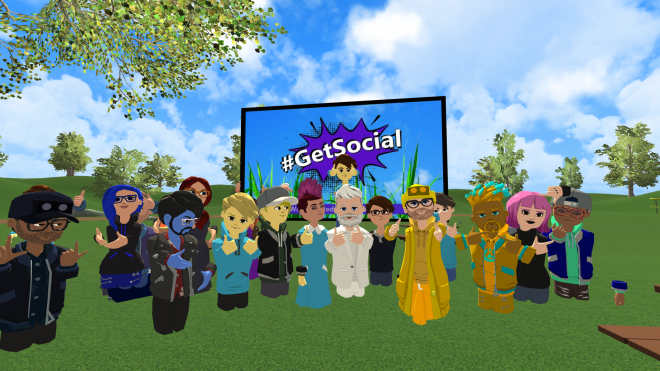
A gathering of the new avatars in the #GetSocial world (source: Twitter)

In summary, I think most AltspaceVR users will be happy with this upgrade. And it addresses one of my pet peeves about the platform to date: the old, low-poly, dreadfully cartoony avatars are now banished. Hallelujah!

Wolf3D’s Ready Player Me Creates a 3D Avatar for Mozilla Hubs from a Selfie

Some examples of avatars created using Ready Player Me

Wolf3D, a company that specializes in making personal 3D avatars for games and virtual worlds, has released a new browser-based program called Ready Player Me. Ready Player Me allows you to create a personalized 3D avatar for use in Mozilla Hubs, using as your starting point a single selfie from your cellphone or webcam!

(You might remember Wolf3D as the creators of a mobile app called Virtual You, which High Fidelity released to create a 3D avatar for use on the now-closed social VR platform. This app was withdrawn from the Apple App Store and the Google Play Store when HiFi essentially ceased operations on Jan. 15th, 2020.)

Using Ready Player Me could not be easier. Simply visit the website, click on the blue Create Avatar button to get started, and take (or upload) a selfie. You are then given an array of options to change your skin, hair, eye and eyebrow colour, and hairstyle, facial hair, shirt and eyeglasses. After only a few minutes, here is what I was able to come up with:

Once you are satisfied, just click the checkmark in the upper right-hand corner of the screen, and it saves the avatar, giving you a URL which you should bookmark somewhere for later use and re-use.

To use your newly-created avatar in Mozilla Hubs, open a world, click on the three-bars menu in the upper left-hand corner, and click on Set Name & Avatar:

On the Name & Avatar screen, click on Browse Avatars:

On the Browse Avatars screen, click on Avatar GLB URL in the upper right-hand corner of your screen:

Enter the URL you received from Ready Player Me, and click Accept:

That’s it! Here’s what my customized avatar looks like in Mozilla Hubs:

I am hoping that we will see Wolf3D-made avatars pop up in other social VR and virtual worlds! It’s such an easy way for somebody to create a personalized avatar.

P.S. Starting with this blogpost, I have created a new category called Mozilla Hubs, since I find myself writing about this platform more often. I will try to go back and add my older blogposts about Mozilla Hubs to this category, but that is going to take a little time, so please bear with me!