How to Create a Good Starter Wardrobe for Your Sinespace Avatar for Free (Male Edition), Plus Three Sinespace Promotional Codes You Should Not Pass Up!

Up here in Winnipeg it is a cold, blustery day, and we are expecting another 10 to 20 centimetres (4 to 8 inches) of snow. So I am huddled in my warm, cozy apartment, setting up a male alt on Sinespace from scratch using these step-by-step instructions, to see what kind of a starter outfit I can create for him using the 30,000 Silver which Sinespace gives all new users. (I previously did the same thing for a female Sinespace avatar here and here.)


First, and most importantly, did you know that there no less than three promotional codes you can pick up from various websites that you can use to pick up some nice perks for your new Sinespace avatar? This is the perfect time for you to get started in Sinespace!

I tested all three today and they still work:

  1. Use the promotional code in this Forbes article to pick up a free Shyla skin, shape, and eyes package from Daz Originals (I might not need them for this male avatar, but it is very easy to change your name and your gender in Sinespace, so you never know!);
  2. Use the promotional code in this New World Notes blogpost to receive 500 Gold currency, free; and
  3. Use of the two promotional codes in this blogpost I wrote to get one month of Premium membership for free! If you take advantage of this one-month free Premium promotion, you will receive 600 Gold over those four weeks, along with many other benefits.

So, armed with 500 Gold (from promotion #2 above) and 30,000 Silver, let’s go on a shopping spree! Please note that I will not be blogging about the numerous low-cost items from Sine Wave, as I want to promote the content creators.


The first thing you should do is click on the Shop button in the row of blue buttons along the bottom of your Sinespace client. Then, click on the tab that says Clothes. Finally, click on the word Gold in the blue bar across the top of the listings, and if the arrow next to it is pointing down, click on that arrow once so that it points up. In three easy steps, you now have a list of items sorted by price from lowest to highest. (This technique also works if you click on Silver instead of Gold.)

Monks sells a pair of men’s Swim Trunks for only 10 Gold, which comes in six different colours and patterns as shown:

Note that if you buy the white pair of swim trunks, you can tint them any colour you want in the Outfit window. Just wear the item from your inventory, click the Wearing button on the top left, scroll down to find the item, and click on the Material 1 button to select a colour:

For only 25 Gold, you can pick up any number of T-shirts from various designers, such as this colourful Skull Tee by kawaii pets:

The Plasma Fury T-shirt by Lyk-Art also costs 25 Gold, and comes in twelve different colours:

Lyk-Art also sells men’s dress shirts in a variety of patterns, like this skull-and-crossed-swords pirate pattern, for 25 Gold each:

They also sell a Gift-Wrapped Shirt (for gift giving, perhaps?) which comes in a dozen different colourful patterns:

Here is one of the Gift-Wrapped shirts, with the skinny jeans from the default wardrobe:

If you are looking for facial hair, do a keyword search under the Clothes tab for “Barva”, and you will find many different kinds of beards and mustaches for only 25 Gold each:

BlakOpal Designs sells various kinds of sport and dress socks for only 29 Gold (or 500 Silver) each pair. These are applied to the tattoo layer of your avatar, so they will work with any outfit or pair of shoes you own:

I picked up a pair of black dress socks for 500 Silver.

The men’s Open Collar Shirt by BlakOpal Designs is a wardrobe staple. It sells for 79 Gold and comes in five colours: white, red, dark grey, cream, and blue (note that you cannot tint this item).

BlakOpal also sells Marco jeans in seven colours for 99 Gold each pair:

The Soledad hairstyle from NEWSEA comes in nine different colours for 99 Gold each. If you buy the beige version, you can tint it any colour using the colour wheel:

This Male Sweater from Temenos3D comes in five colours: white as shown, plus black, green, blue, and red. (Please note that you cannot tint this sweater.)

At this point, we have used up almoat all of our Gold, and we now click on the Silver button in the blue bar above the Clothing listings to sort by increasing price in Silver currency (see green arrow in the diagram below):

You can pick up some lovely men’s eyes for free from Jz for Men:

The Simple Basics undershirt and boxers by Temenos3D are 500 Silver each, and come in five colours: white as shown, plus green, blue, red, and black (they are not tintable).

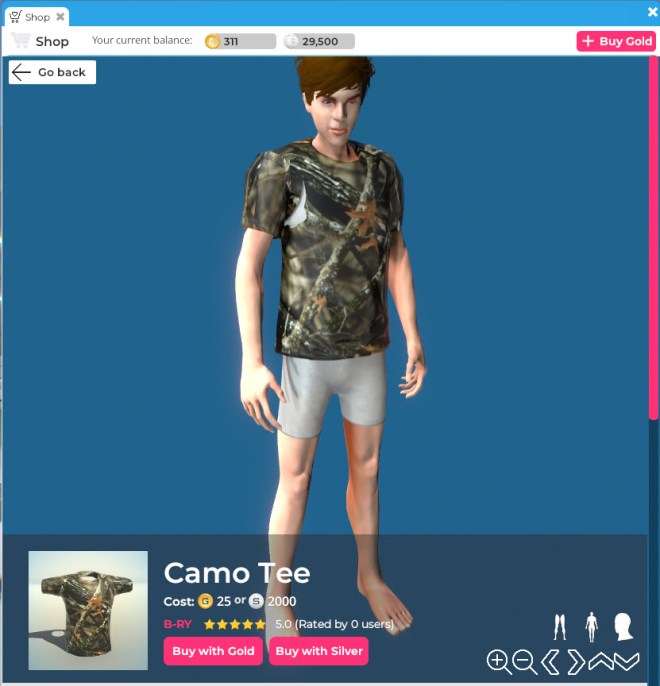
This camouflage pattern T-shirt by B-RY is only 2000 Silver:
This “Life Begins After Coffee” T-shirt from RAMBO is 2500 Silver:

These Bright Blue Eyes by Jz for Men are 2500 Silver:

My final purchase of the day is the short Bradley hairstyle by Junk.In.The.Box for 20,000 Silver, which comes in a wide variety of colours and is tintable on top of that:

So, as you can see, you can create a good starter wardrobe for your male Sinespace avatar, by carefully spending your initial 30,000 Silver and taking advantage of the promo code to pick up 500 free Gold!

Happy shopping!


This blogpost is sponsored by Sinespace, and was written in my new role as an embedded reporter for this virtual world (more details here).

MUST WATCH VIDEO: Jesse Damiani Talks with Voices of VR Podcast Host Kent Bye on Tech Tock

Jesse Damiani (LinkedIn, Twitter, Wikipedia) hosts a regular talk show called Tech Tock on the Microsoft-owned social VR platform AltspaceVR, and his guest yesterday was Kent Bye, the host of the Voices of VR podcast. (I have blogged before about Kent Bye here and here.)

I’m really sorry I missed this event (I’ve been busy conducting library training sessions for various classes at work all this week at the university, and I just came home last night exhausted, so I gave this a pass). But thankfully, someone has posted a YouTube recording of Kent’s entire presentation and his conversation with Jesse afterwards.

Kent Bye is an extremely information-dense speaker who hops from topic to topic with alarming ease, so you might want to set aside some time and watch this video is small bites, so you don’t get complete information overload! His twenty-minute overview presentation about virtual reality is an absolute must-watch, and the conversation afterward with Jesse Damiani is also very informative, engaging, and wide-ranging. The last half of this YouTube video is a question-and-answer session with members of the studio audience.

So set aside an hour and 40 minutes, and watch the whole thing. It’s amazing. I think that Kent Bye is one of the most informed and articulate speakers about virtual reality that I have ever encountered! Bravo, Kent. And thank you for bringing him onto the show as a guest, Jesse.

“After a nuclear holocaust, all that will be left are Cher and cockroaches”: The Wastelands Celebrates Its 13th Anniversary in Second Life

As Wagner James Au reported on his blog New World Notes, the post-apocalyptic roleplay sim The Wastelands is celebrating its 13th anniversary this weekend. The Wastelands is the oldest and largest post-apocalyptic themed estate within Second Life, consisting of 10 sims.

A map of The Wastelands

So I thought it might be fun to trot out my Cher lookalike avatar, complete with animated cockroaches, to party like it’s 1999!

There used to be a store in Second Life called Body Doubles, where you could buy a (classic, system) avatar shape along with a notecard with details on where to get skin, hair, eyes, etc. to build a perfect duplicate of your celebrity crush. I think I got pretty close to the real thing! 😉

Here she is in action, courtesy of a wonderful animated microphone I originally picked up for my Elvis Presley impersonator avatar 😛 good thing it’s transferable!

“After a nuclear holocaust, all that will be left are Cher and cockroaches”

If you want to join in the fun and festivities, here’s the complete schedule of events in The Wastelands. And if you want more information about the project, here’s their website and their wiki.

Abramelin Wolfe Brings His Abranimations Brand of Avatar Dances to Sinespace

Abranimations is a well-known brand of avatar animations in several virtual worlds, including Second Life, IMVU, and Sansar. Jim Clark of Edinburgh, Scotland (better known by his avatar name, Abramelin Wolfe) is the creator behind the Abranimations brand.

Abramelin Wolfe has been profiled by the documentary filmmaker Draxtor Despres twice: once in Second Life (in 2013) and a second time in Sansar (in 2019):


Well, Abramelin Wolfe has finally brought his dance animations into Sinespace! Here’s a link to his brand-new store on the Sinespace Shop, where he has dozens and dozens of dance animations available for sale for only 50 Gold each (and some dances can also be bought for 5,000 Silver):

And here’s a quick sample, a 7-second video courtesy of Sinespace user Alicia, dancing her heart out at the Welcome Centre (thanks, Alicia!):

Earlier this week, I interviewed Abramelin Wolfe via text chat about the launch of his Abranimations brand in Sinespace:


How did you get started in creating animations and other content for virtual worlds? Please tell us a bit of your background.

I first found my way into Virtual Worlds in 2004 when I Joined Second Life. At the time I was working as a freelance website developer. I played Second Life for fun and enjoyed using my prior programming experience to create fun toys and gadgets. I had no expectations of it making any money, I just loved the creative outlet it provided. I can’t remember exactly when, but at some stage I found it was making a substantial part of my monthly income so I dedicated more time to it. When I first joined SL I played a lot with particles and tried making various vehicles, furniture and I made a magic staff for my avatar (who was a wizard at the time). I found myself wanting to learn all the tools SL had so before long figured I’d try animating too. I started with Poser which was recommended by LL at the time. For a while I created animations using that. A bit later I decided to invest in a relatively cheap inertial mocap system which was how I got into mocap. Today I primarily use an optical motion capture system that is much more precise.

What platforms have you made animations for?

As well as the Second Life store, we also have stores in IMVU, Sansar, and more recently we opened a Hypergrid-enabled OpenSim region. This week, I opened up shop in Sinespace, too.

What hardware and software tools do you use to create animations today? Have there been significant changes in the tools you used since you started doing this?

I create most animations now using an OptiTrack mocap (motion capture) system to record trained actors & dancers. I use the system software to clean up the raw optical data and then perform further cleanup and final processing in Autodesk MotionBuilder. My first animations  back in 2004 were made using Poser. I used it a lot for quite a few years. I liked Poser, but it was not very good for motion capture data cleanup. I moved to use MotionBuilder which is built for this purpose. There is a dramatic difference in quality and realism in mocap over keyframed animation. However it is very expensive (equipment, studio space, dance hire, software etc.) and it can be very time consuming recording and cleaning up the data to a high standard. If I want a quick animation and am not worried so much about  realism I will still keyframe animate by hand. We  also make lots of other content today, my wife works with me now too. As well as helping with the mocap studio she is an artist and makes all our avatars and other characters. 

Could you briefly outline the steps involved in creating an animation from scratch (not too technical, just a general overview that my blog readers could understand easily).

I first decide what animation I want to make. This could be a specific dance or something else. I’ll research and refine a shot list and then hire a dancer or actor that is able to perform the motions. In the studio we suit them up in a black lycra suit  with reflective markers stuck to it and record them with special mocap cameras. The mocap system records the markers as dots moving in 3D space and the software processes this to generate a moving skeleton from it. The resulting data tends to need a lot of post-shoot work to fix various problems. Once the optical data is clean I export it from the system and import it into MotionBuilder for further cleanup and processing of the skeletal data. There are various issues at this stage too that also need fixing. Once the animation is free of errors and is processed to look as intended I transfer the data onto the final skeleton used by the end platform. If it all looks good I’ll then  upload the animation onto the end platform and hopfully it works!

What advice would you give to people who want to create content in Sinespace and are just starting out?

Well Sinespace is based on Unity, so the first thing I’d say is download a copy of Unity!  There’s  loads of tutorials online that can be helpful in learning just about every game engine and software application. Don’t be put off by any initial daunting feelings, some  software can seem pretty formidable when you first open it up. But if you persevere eventually everything falls into place.  Finally, never think something is too hard or impossible even if other people tell you so, just give it a go, and have fun!


This blogpost is sponsored by Sinespace, and was written in my new role as an embedded reporter for this virtual world (more details here).